Dokie AI vs SimpleDraw
Side-by-side comparison to help you choose the right product.

Dokie AI
Dokie AI empowers teams to effortlessly create stunning professional presentations in minutes using advanced AI technology.
Last updated: March 19, 2026

SimpleDraw
Collaborate seamlessly to create precise floor plans and scale drawings together online.
Last updated: March 1, 2026
Visual Comparison
Dokie AI

SimpleDraw
Feature Comparison
Dokie AI
AI Generate PPT
The AI Generate PPT feature allows users to describe their topic in plain text and receive a complete slide deck in return. This tool takes care of professional layouts, impactful charts, and engaging content, ensuring that users can focus on their message rather than the design process.
AI Beautify PPT
With the AI Beautify PPT feature, users can upload existing presentations and watch as Dokie AI enhances their design. This feature fixes layouts and applies professional styling while preserving the original content, turning ordinary slides into visually appealing presentations.
Speech Notes Generation
Dokie AI's Speech Notes Generation feature automatically creates detailed speaker notes and talking points for each slide. This functionality helps users deliver their presentations with confidence, providing them with key insights and prompts to engage their audience effectively.
Multi-format Conversion
Dokie AI supports a variety of file conversions, including PDF to PPT, Word to PPT, and HTML to PPT. This multi-format conversion capability allows users to transform various document types into presentations seamlessly, ensuring a smooth workflow and versatility in content creation.
SimpleDraw
Dedicated Floor Plan Mode
This specialized mode is built for seamless collaboration on architectural layouts. Teams can effortlessly draw walls and add windows and doors with a single click, viewing real-time measurements as adjustments are made. A comprehensive library of interior fixtures for kitchens, bathrooms, and living spaces allows everyone on the project to contribute to a unified vision, ensuring all elements are accurately placed and scaled from the very beginning.
Smart Alignment & Grid System
Our intelligent alignment system fosters a cooperative drawing experience by assisting team members in placing points and lines precisely. It provides clear visual cues to guide users, reducing errors and ensuring consistency across the drawing. For ultimate collaborative control, you can zoom in for fine detail or use keyboard shortcuts to lock movements to specific axes, allowing the team to work together with both flexibility and pinpoint accuracy.
Non-Destructive Editing & Full Control
Every element in your collaborative drawing can be modified at any time, encouraging iterative teamwork without the fear of making permanent mistakes. With robust undo/redo functions and the ability to group, move, copy, and paste elements together, teams can streamline repetitive tasks. Furthermore, direct keyboard input for dimensions allows for precise, shared decision-making on measurements, perfect for refining plans together.
Comprehensive Measurement System
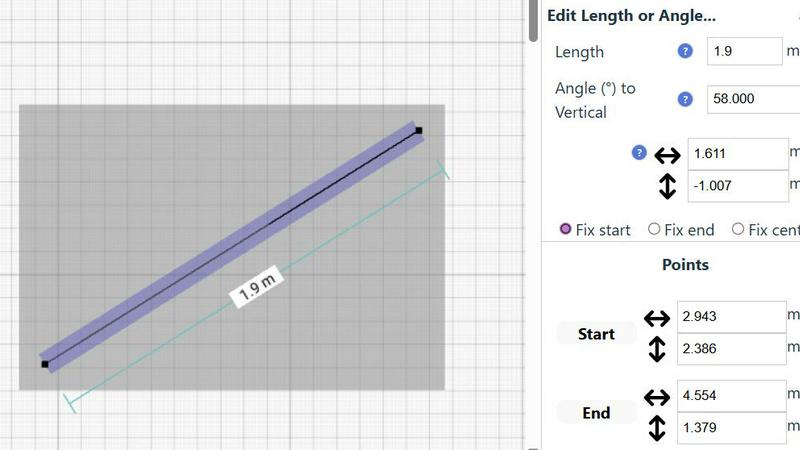
Facilitate clear communication with a dynamic measurement system that displays contextual dimensions as your team works. With fine-grained control over which measurements are shown and the choice between metric and US standard units, everyone stays on the same page. This ensures all collaborators, regardless of their role, are working from the same accurate data, eliminating confusion and fostering a synergistic planning environment.
Use Cases
Dokie AI
Business Presentations
Business professionals can utilize Dokie AI to create impactful presentations for meetings, pitches, and conferences. The tool's ability to generate visually appealing slides quickly and efficiently enables teams to focus on strategy and delivery.
Educational Lectures
Educators can leverage Dokie AI to develop engaging lecture slides that enhance student learning. By automating the design process, teachers can dedicate more time to content creation and interaction with students.
Marketing Campaigns
Marketers can use Dokie AI to craft persuasive presentations for product launches or marketing strategies. The AI-generated presentations help convey complex ideas clearly and attractively, ensuring maximum impact.
Startup Pitches
Startup founders can benefit from Dokie AI when preparing pitch decks for investors. With the ability to create professional, polished presentations quickly, entrepreneurs can present their ideas effectively and make a strong impression.
SimpleDraw
Home Renovation Planning
Collaborate with family members or contractors on kitchen and bathroom remodels. Create accurate scale drawings to experiment with different layouts, appliance placements, and fixture selections before any physical work begins. This shared visual plan ensures everyone involved has a clear, unified understanding of the project scope and design intent, preventing costly miscommunications.
Furniture & Room Layout Coordination
Plan bedroom, living room, or office layouts with roommates, family, or colleagues. Test if new furniture will fit and function well in your space by creating a shared digital blueprint. This collaborative approach allows a team to visualize traffic flow, spacing, and aesthetic arrangements together, making collective purchasing and arrangement decisions with confidence.
Real Estate & Rental Listing Visualization
Landlords, real estate agents, and potential tenants can work together to create and share clear floor plans for apartments or houses. These accurate drawings provide a reliable scale reference for property listings, helping teams of buyers, renters, and agents discuss spatial logistics and potential layouts effectively during the decision-making process.
DIY Project Design & Team Brainstorming
Whether planning a garden shed, a custom piece of furniture, or a workshop organization system, SimpleDraw serves as a central hub for team brainstorming. Sketch ideas to scale, iterate on designs collaboratively, and produce a precise plan that all team members can follow, ensuring the final build matches the shared vision and all measurements are correctly understood.
Overview
About Dokie AI
Dokie AI is a cutting-edge AI presentation maker designed to help business professionals, educators, marketers, and startup founders create visually stunning presentations without requiring any design skills. This innovative tool leverages the power of Claude Opus 4.6 to automate the entire presentation creation process, managing everything from content structure to layout selection, typography, and visual design. Dokie AI offers multiple modes to cater to various needs, including generating presentations from scratch, enhancing existing slides, adding speaker notes, and converting documents into PowerPoint presentations. With Dokie AI, users can produce polished, professional results in a fraction of the time it would take using traditional methods, making it an invaluable asset for anyone looking to effectively communicate their ideas.
About SimpleDraw
SimpleDraw is a collaborative, free online tool designed to make precise scale drawing accessible to everyone. It transforms the complex task of creating accurate technical drawings into a simple, intuitive process that feels as natural as using pen and paper, but with the power of digital precision. Built for casual users, DIY enthusiasts, and anyone planning a home project, SimpleDraw eliminates the steep learning curve of traditional CAD software. Its core mission is to empower individuals and teams to visualize their ideas clearly and accurately, fostering better planning and communication for any project. The tool operates entirely in your web browser with no downloads, installations, or account sign-ups required, ensuring you and your collaborators can start working on your shared vision immediately. By focusing on a streamlined set of powerful features, SimpleDraw promotes a synergistic workflow where the tool intuitively supports your creative and planning process, helping you and your team bring detailed floor plans and scale drawings to life with ease and confidence. It's the perfect platform for teams to align on project details, from initial sketches to finalized layouts.
Frequently Asked Questions
Dokie AI FAQ
How does Dokie AI generate presentations?
Dokie AI generates presentations by analyzing user-provided text descriptions and automatically creating a complete slide deck. It utilizes advanced AI technology to determine the best layouts, typography, and visual elements based on the input.
Can I enhance my existing presentations with Dokie AI?
Yes, Dokie AI offers a Beautify feature that allows users to upload existing presentations. The AI will enhance the design, fix layouts, and apply professional styling to improve the overall look and feel of your slides.
What types of documents can be converted into presentations?
Dokie AI supports various document conversions, including PDF to PPT, Word to PPT, HTML to PPT, and even YouTube videos to presentations. This versatility makes it easy to repurpose content for different formats.
Is there a free trial available for Dokie AI?
While specific details about a free trial are not mentioned, Dokie AI operates on a pay-as-you-go basis, allowing users to explore its features without a long-term commitment. Users can choose from various pricing plans based on their needs.
SimpleDraw FAQ
Is SimpleDraw really free to use?
Yes, SimpleDraw is completely free. There is no cost to access the core scale drawing and floor plan creation tools. You can start drawing immediately in your web browser without any account sign-up, software download, or subscription fee, making it easy for entire teams to jump in and collaborate at no cost.
Do I need any technical or CAD experience to use it?
No prior experience is needed. SimpleDraw is specifically designed to be intuitive for beginners, removing the steep learning curve of professional CAD software. Its smart alignment tools and simple interface make precise drawing feel natural, allowing teams of all skill levels to contribute effectively to a project from the start.
Can I use SimpleDraw on any device?
SimpleDraw operates entirely in your web browser, so it works on most modern devices including Windows PCs, Macs, Chromebooks, and tablets. As long as you have an internet connection and a compatible browser, you and your team can access and collaborate on your drawings from virtually anywhere.
How does SimpleDraw support team collaboration?
While the current focus is on individual creation with shared output, the tool's design philosophy is centered on synergy. Features like non-destructive editing, precise shared measurements, and easy sharing of drawing files facilitate clear communication. The development is also community-driven via platforms like Discord, where teams of users can collectively request features and guide the product's evolution to better serve collaborative workflows.
Alternatives
Dokie AI Alternatives
Dokie AI is a leading AI presentation maker that empowers users to create professional-quality slides in just minutes. It belongs to the design tools category, specifically tailored for business professionals, educators, marketers, and startup founders who seek to produce polished presentations without requiring extensive design skills. Users often explore alternatives to Dokie AI for various reasons, such as pricing considerations, feature sets that better align with their specific needs, or compatibility with their preferred platforms. When searching for an alternative, it's essential to evaluate factors like ease of use, the range of features offered, pricing models, and the level of support provided. Other considerations include the flexibility of design options and the ability to enhance existing presentations, which can significantly impact user experience and satisfaction.
SimpleDraw Alternatives
SimpleDraw is a collaborative, free online tool designed for creating precise scale drawings and floor plans. It belongs to the category of design tools, specifically focusing on making technical drawing accessible without the complexity of traditional CAD software. Users often explore alternatives for various reasons. Some may require advanced features beyond core drawing, need offline desktop software, or seek tools integrated with specific project management platforms. Others might look for options tailored to very specialized professional use cases. When choosing an alternative, consider your team's primary needs. Key factors include the required level of precision, the importance of real-time collaboration, your budget, and whether you need a web-based or installed application. The ideal tool should foster a synergistic workflow that matches your project's scale and complexity.