
Img Editor vs Seedream 4.0
Side-by-side comparison to help you choose the right product.

Img Editor
Unleash your vision together with our AI, transforming ideas into stunning images in seconds.
Last updated: February 28, 2026

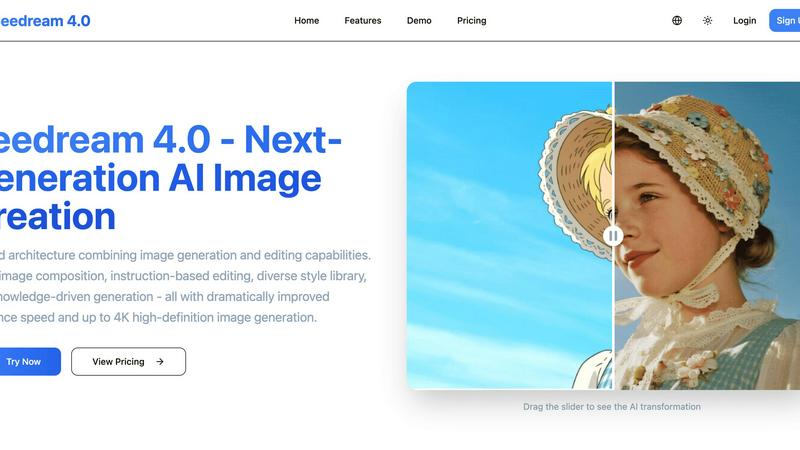
Seedream 4.0
Seedream 4.0 empowers your team to create and edit stunning AI images together with precision and speed.
Last updated: March 1, 2026
Visual Comparison
Img Editor

Seedream 4.0
Feature Comparison
Img Editor
Text-to-Image Generation
This core feature allows you to collaborate with AI to transform your written ideas into detailed, high-quality images. Simply describe your vision in the prompt box, and Img Editor's advanced AI will work with you to generate a visual representation. You can specify aspect ratios and select from various quality levels, including Standard and High-Quality Nano Photo options, ensuring the output meets your project's specific needs, from social media graphics to concept art.
Advanced Image Editing & Description
Go beyond generation with powerful editing tools. You can upload an existing image and use the 'Describe Your Image' feature to let AI analyze it and create a detailed text description. This description can then be edited and used to generate new, modified versions of the original, allowing for iterative refinement and collaborative ideation between your vision and the AI's capabilities for perfecting a visual concept.
Community-Powered Prompt Generator & Gallery
The integrated gallery and prompt generator are built for synergy. Browse a vast collection of community-submitted images and prompts for inspiration. You can click on any popular prompt to instantly try it yourself, learning from the collective creativity of other users. This shared resource pool accelerates the creative process and helps the entire community discover new techniques and ideas together.
Free Tier with Reward System
Img Editor champions accessibility through a generous free plan, allowing teams and individuals to start creating without cost. Users receive free generations daily. Furthermore, the platform incentivizes community contribution; by submitting your approved creations to the public gallery, you earn extra generations. This system fosters a cooperative ecosystem where sharing knowledge and art benefits everyone involved.
Seedream 4.0
Unified Generation & Editing Architecture
This foundational feature eliminates the need to switch between disparate tools, creating a harmonious workflow for teams. The architecture allows for a fluid transition from generating a brand-new image to making precise edits, all within the same interface. This synergy saves valuable time and reduces friction, enabling creative collaborators to iterate and refine concepts together in real-time, maintaining a consistent vision from the first sketch to the final polished asset.
Multi-Image Composition
Unlock powerful collaborative storytelling by inputting multiple reference images to guide a single, cohesive output. This feature is perfect for teams assembling mood boards, merging brand elements, or creating complex scenes that draw from various visual sources. It allows a group to pool their visual inspirations and achieve a unified composition with a simple sentence, streamlining the process of building rich, layered visuals that satisfy diverse creative inputs.
Instruction-Based Editing
Foster clear and effective team communication with true "what you say is what you get" functionality. Instead of navigating complex software menus, team members can describe desired changes in plain language. This makes giving feedback and executing revisions intuitive, ensuring that designers, marketers, and clients are perfectly aligned. It democratizes the editing process, allowing anyone on the team to contribute precise creative direction.
Knowledge-Driven Generation & Diverse Styles
This dual-capability feature supports a wide range of collaborative projects. The knowledge-driven engine ensures teams can create accurate educational diagrams, technical illustrations, and professional charts with confidence. Simultaneously, the extensive style library—from watercolor to cyberpunk—provides a shared visual vocabulary. Teams can easily experiment and agree on a stylistic direction, ensuring brand consistency and creative exploration are both fully supported.
Use Cases
Img Editor
Concept Art & Brainstorming for Teams
Creative teams, including game developers and filmmakers, can use Img Editor to rapidly visualize concepts during brainstorming sessions. By generating multiple visual iterations from a single text prompt, team members can align their vision, explore different artistic directions collaboratively, and settle on a cohesive design faster, streamlining the early creative process.
Social Media & Marketing Content Creation
Marketing professionals and social media managers can leverage the platform to produce a high volume of engaging, original visuals. From generating branded artwork for campaigns to creating unique images for posts and ads, Img Editor helps small teams and solo entrepreneurs maintain a consistent and professional visual identity without needing a dedicated graphic designer.
Personal Art Project Development
Artists and hobbyists can use the tool as a digital sketchpad to overcome creative blocks and experiment with new styles. The ability to start with a text description, edit the resulting image, and draw inspiration from the community gallery makes it an excellent partner for developing personal art projects, learning new techniques, and refining one's artistic voice through exploration.
Educational Visual Aids & Presentations
Educators and students can collaborate with Img Editor to create custom visual aids, diagrams, and illustrations for presentations, reports, and learning materials. Generating accurate images of historical events, scientific concepts, or literary scenes can make educational content more engaging and accessible, enhancing the learning experience for everyone involved.
Seedream 4.0
Marketing & Brand Asset Creation
Marketing teams can collaborate swiftly to produce a cohesive suite of branded visuals. From social media graphics and ad banners to website imagery, teams can use multi-image composition to blend product photos with brand elements and apply consistent stylistic edits across entire campaigns using instruction-based prompts, ensuring speed and brand alignment.
Design Agency & Creative Workflows
Design agencies can leverage Seedream 4.0 to rapidly prototype concepts for client presentations. The unified platform allows designers, art directors, and clients to iterate on visuals in a conversational manner, making revisions based on simple instructions. This streamlines feedback loops and enables the collaborative creation of unique, high-fidelity mockups and final assets.
Educational Content Development
Educators and content developers can work together to create accurate, engaging learning materials. Using knowledge-driven generation, teams can produce clear scientific diagrams, historical illustrations, and informative charts. The tool allows for easy refinement based on educational standards, making complex subjects visually accessible through collaborative effort.
Personal Projects & Collaborative Hobbies
Creative groups, such as online communities or friends working on a shared project like a game or story, can use Seedream 4.0 to build their visual worlds together. They can collectively guide image generation with multiple references, stylize character art, and edit scenes through simple descriptive feedback, making the creative process a truly shared and synergistic experience.
Overview
About Img Editor
Img Editor is a collaborative AI-powered platform designed to make professional-grade image creation and editing accessible to everyone. By harnessing cutting-edge artificial intelligence, it provides a synergistic space where artists, designers, marketers, content creators, and hobbyists can work together to bring their visual ideas to life. The core mission is to remove financial and technical barriers, fostering a community-driven approach to digital art. With its dual functionality, users can generate entirely new images from simple text descriptions or upload and transform existing photos with advanced editing tools. The platform encourages teamwork and shared growth by offering free daily generations and rewarding community participation with additional resources. Img Editor stands as a testament to how shared technology can empower collective creativity, making it the ideal partner for anyone looking to produce stunning visuals through a cooperative and intuitive experience.
About Seedream 4.0
Seedream 4.0 represents a powerful leap forward in collaborative visual creation, uniting teams and individuals under a single, intuitive platform. It's more than just an AI image generator; it's a comprehensive ecosystem built on a unified architecture that seamlessly blends generation and editing. This synergy empowers everyone, from marketing teams and design agencies to educators and content creators, to work together more efficiently. By breaking down the barriers between idea and execution, Seedream 4.0 fosters a cooperative environment where stunning visuals are born from simple instructions and shared creative vision. Its core value lies in transforming complex workflows into a streamlined, conversational process, enabling teams to produce high-quality, up to 4K images with dramatically improved speed. Whether you're composing assets from multiple references or refining a single concept, Seedream 4.0 is the partner that amplifies your collective creativity, ensuring every member can contribute to and elevate the final masterpiece.
Frequently Asked Questions
Img Editor FAQ
How many free images can I generate?
Img Editor provides users with a generous allowance of free image generations daily. The platform often runs promotions, such as offering 10 free generations, allowing you to explore and create extensively without an initial investment. You can also earn more free generations by actively participating in the community, such as submitting your approved images to the public gallery.
What is Nano Photo quality?
Nano Photo refers to the higher-resolution image quality tiers available on Img Editor, specifically the 2K (High Quality) and 4K (Ultra Quality) options. These settings allow for collaboration on projects that require finer detail and greater clarity, such as prints or high-definition digital displays. Selecting Nano Photo ensures you and the AI work together to produce a professional-grade final asset.
Can I edit an image I already have?
Absolutely. Img Editor is built for both generation and transformation. You can upload your own images and utilize the platform's advanced AI editing tools. A key feature is the ability to have the AI describe your uploaded image, which you can then modify and use as a new prompt to generate an edited or stylized version, facilitating a collaborative revision process.
How does the community gallery work?
The community gallery is a shared space where users can submit their AI-generated images for others to see and use as inspiration. It's a synergistic hub for learning and discovery. When you submit your creation and it gets approved, you are rewarded with extra free generations. You can also click on any prompt in the gallery to automatically load and try it yourself, fostering a cycle of shared creativity.
Seedream 4.0 FAQ
Can I try Seedream 4.0 for free?
Yes, you can experience Seedream 4.0's capabilities by visiting the platform's demo area. The interactive demo allows you to test core features like instruction-based editing without an account. For full access to generation credits, style libraries, and high-resolution exports, you can explore the various subscription plans designed for different levels of collaborative need.
How does Seedream 4.0 work?
Seedream 4.0 operates on a sophisticated unified AI architecture. You provide a text instruction or upload reference images. The platform's AI understands your request, leverages its knowledge base and style models, and processes the information to generate or edit an image. This collaborative process between your input and the AI's capabilities happens with improved inference speed, delivering high-definition results up to 4K resolution.
What makes Seedream 4.0 different from other AI image tools?
Seedream 4.0 stands out through its deeply integrated, unified approach that combines generation and editing into one cooperative workflow. Features like multi-image composition and true instruction-based editing are designed for team-oriented creation, reducing tool-switching and miscommunication. Its focus on both creative styles and knowledge-driven accuracy makes it a versatile partner for a wider range of professional and collaborative projects.
Can I use the images I generate commercially?
Yes, images generated by Seedream 4.0 are provided for your use, including commercial applications such as marketing materials, website content, and product designs. It is always recommended to review the specific Terms of Service for detailed licensing information to ensure your usage complies with the platform's policies, especially for sensitive or high-stakes commercial projects.
Alternatives
Img Editor Alternatives
Img Editor is a leading platform in the image and photo category, specializing in AI-powered creation and editing. It empowers teams to collaborate on turning imaginative ideas into stunning visuals through an intuitive and accessible interface. Users often explore alternatives for various reasons, such as needing different pricing structures, specific advanced features for professional workflows, or compatibility with other platforms in their creative toolkit. It's a natural part of finding the perfect collaborative fit for a project's unique demands. When evaluating other options, it's wise to consider the core needs of your team. Look for synergy between the tool's capabilities and your collaborative goals, balancing factors like creative control, output quality, ease of use, and how well it integrates into your existing creative process.
Seedream 4.0 Alternatives
Seedream 4.0 is a powerful AI image generator and editor that empowers teams to create and modify stunning visuals with precision. It falls within the image and photo software category, combining advanced generation with intuitive editing tools in a single platform. This makes it a valuable asset for collaborative projects where visual content is key. Teams often explore alternatives to find a solution that aligns perfectly with their unique workflow and goals. Common reasons include budget considerations, the need for specific features not covered, or platform compatibility requirements. The search for the right tool is a natural step in optimizing a team's creative synergy. When evaluating other options, it's wise for a team to consider several core factors. Look at the balance of generation power and editing flexibility, the tool's ability to support collaborative projects, and the overall value it brings to your shared creative process. The goal is to find a partner that enhances your team's collective ability to produce compelling visual work.