ResponseHub vs Tickari
Side-by-side comparison to help you choose the right product.

ResponseHub
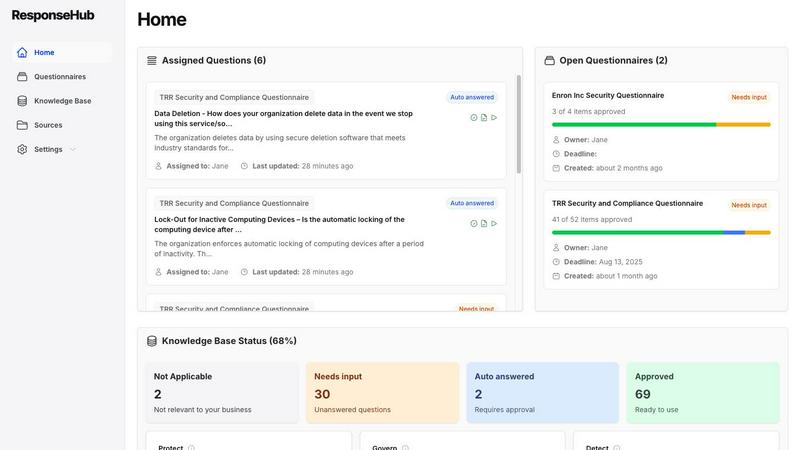
Automate security questionnaire responses with AI for faster, accurate submissions that let your team focus on what.
Last updated: February 28, 2026

The no-nonsense task manager that actually helps you get things done. No clutter. No complexity. Just you and your tasks.
Visual Comparison
ResponseHub
Tickari

Overview
About ResponseHub
ResponseHub is a cutting-edge security questionnaire automation platform that revolutionizes the way organizations manage vendor security assessments and compliance questionnaires. Designed for a diverse range of industries, including technology, finance, and healthcare, ResponseHub leverages advanced artificial intelligence to facilitate the efficient processing of security questionnaires in multiple spreadsheet formats. By drastically reducing the time and effort involved in crafting accurate responses, ResponseHub empowers teams to focus on their core business operations instead of getting mired in compliance paperwork. The platform automatically generates answers based on uploaded policy documents, Standard Operating Procedures (SOPs), and other relevant organizational materials, ensuring that each response is meticulously traced to its source. This unique capability not only enhances productivity but also instills confidence in the accuracy of the information provided. With ResponseHub, organizations can tackle security assessments with assurance and clarity, ultimately driving their business objectives forward.
About Tickari
Tickari is a deliberately minimal, no-nonsense task manager designed for people who are tired of overcomplicated productivity tools and just want to get things done. Instead of overwhelming you with features like complex boards, AI-generated suggestions, or endless customization, Tickari focuses on a simple, frictionless workflow: write a task, tick it off, and move on.
The product embraces a “less but better” philosophy—eliminating clutter, reducing cognitive overhead, and removing the need for onboarding tutorials or setup processes. There are no distractions, no unnecessary decisions, and no feature bloat—just a clean interface that works instantly the moment you open it. This makes it particularly effective for users who feel stuck organizing tasks instead of actually completing them.