Refbox vs Supermachine
Side-by-side comparison to help you choose the right product.

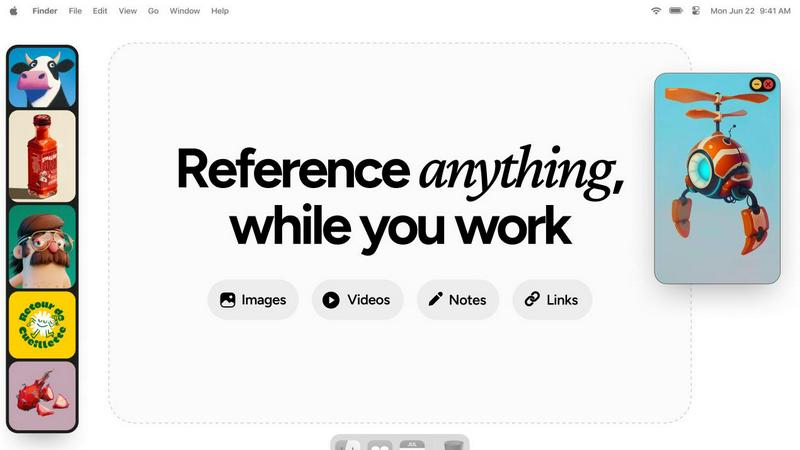
Refbox keeps all your images, videos, and notes at your fingertips for effortless reference while you create.
Last updated: February 28, 2026

Supermachine
Supermachine unites creators with powerful AI to generate stunning, commercial images and videos together.
Last updated: March 18, 2026
Visual Comparison
Refbox
Supermachine

Feature Comparison
Refbox
Floating Resizable Frames
Refbox offers floating frames that can be resized and positioned over any application. This ensures that your references remain visible and accessible, enhancing your workflow without disrupting your focus.
Infinite Canvas
With Refbox, users can enjoy an infinite canvas where they can view all their reference materials at once. This feature allows for quick comparisons and easy navigation through items, streamlining the creative process significantly.
Auto-Hide Functionality
The auto-hide feature allows users to minimize distractions by keeping the reference box hidden until needed. This ensures that creatives can maintain their focus on the task at hand without unnecessary interruptions.
GIF Playback and Pixel Rendering
Refbox supports GIF playback, allowing users to step through each frame for detailed analysis. Additionally, it offers pixel rendering for precise viewing of pixel art, ensuring that every detail is captured accurately.
Supermachine
Curated Model Library
Supermachine provides a carefully selected arsenal of over 60 high-performing AI models. Our team continuously tests and curates the landscape, integrating only the most reliable and effective models for image and video generation. This collaborative approach to model selection saves your team time and ensures consistent, professional-quality outputs without the hassle of navigating an overwhelming array of untested options.
AI Image Edit Tool
Go beyond generation with powerful in-platform editing. This feature acts as a collaborative digital workshop, allowing teams to seamlessly edit and refine AI-generated images. Make precise adjustments, add elements, or alter compositions without needing separate, complex software, streamlining the revision process and enabling real-time creative teamwork on any visual asset.
Video Generation
Unlock the power of AI for motion content. This feature allows your team to co-create engaging short-form videos, animations, and motion graphics directly within Supermachine. It simplifies a typically complex process, enabling marketers, content creators, and social media managers to rapidly prototype and produce video content that captures attention and drives synergy across campaigns.
ControlNet & Advanced Control
Gain unparalleled creative control for collaborative projects. Features like ControlNet allow teams to use input images (like sketches or poses) to guide the AI's generation precisely. Combined with custom sizing, face swap capabilities, and upscaling tools, this suite empowers teams to execute specific visual concepts and maintain brand consistency across all generated assets.
Use Cases
Refbox
Streamlined Moodboarding
Refbox is ideal for designers creating mood boards. It allows them to pin images and notes in an organized manner, making it easy to visualize concepts and themes for upcoming projects.
Enhanced 3D Modeling
3D artists can utilize Refbox to keep reference images and materials readily accessible. This capability helps streamline the modeling process, ensuring that inspiration is just a glance away while working in complex software.
Efficient Animation Workflow
Animators benefit from Refbox by having quick access to reference videos and notes. This facilitates a smoother workflow, allowing them to focus on timing and movement without interruptions from constant tab switching.
Product Design Prototyping
Product designers can use Refbox to pin sketches, images, and specifications all in one place. This organization aids in maintaining clarity and focus, especially during the prototyping phase where multiple references are often needed.
Supermachine
Social Media Team Content Creation
Marketing and social media teams can collaborate to produce a high volume of fresh, on-brand visuals daily. From Instagram carousels and Facebook ads to YouTube thumbnails and TikTok clips, Supermachine enables the rapid co-creation of engaging content that resonates with audiences, keeping the editorial calendar full and the creative synergy flowing.
Small Business Marketing & Advertising
Small business owners and their collaborators can professionally produce their own marketing materials. This includes creating website banners, product mockups, digital ad visuals, and email campaign graphics. Supermachine acts as an in-house creative partner, empowering small teams to build a strong visual brand identity together without agency costs.
Digital Art & NFT Projects
Artists and digital collectives can use Supermachine as a collaborative studio for exploration and creation. It's ideal for generating unique concepts, iterating on styles, and producing collections of illustrations or assets for NFT projects. The platform's diverse models serve as a springboard for collective creativity and innovation in the digital art space.
Rapid Prototyping for Agencies & Designers
Creative agencies and freelance designers can leverage Supermachine for brainstorming and rapid prototyping. Teams can quickly generate multiple visual concepts for client pitches, storyboards, or mood boards. This accelerates the initial creative phase, fosters better client collaboration through tangible examples, and allows human designers to focus on refined execution.
Overview
About Refbox
Refbox is an innovative floating reference application tailored for creative professionals who seek inspiration while they work. Designed for artists, designers, animators, and other creatives, Refbox allows users to pin images, GIFs, videos, and notes within resizable frames that float above their working applications. This unique feature eliminates the disruptive need for constant window switching, enabling users to maintain focus and enhance productivity. The primary value proposition of Refbox lies in its ability to provide instant access to a wealth of reference material without the clutter of multiple tabs and folders. Refbox is more than just a tool; it acts as a collaborative partner, empowering creatives to access their sources of inspiration effortlessly, thereby fostering a seamless workflow. Whether sketching, designing, or modeling, Refbox ensures that your creative resources are always within reach, making it an indispensable asset for professionals striving for excellence in their craft.
About Supermachine
Supermachine is a collaborative, all-in-one creative studio powered by artificial intelligence, designed to bring teams and individual creators together. It democratizes professional-grade visual creation by simplifying the entire process, making it accessible to creators of all skill levels. Whether you're part of a marketing team crafting campaign assets, a social media squad needing daily content, an artist collective exploring new digital frontiers, or a small business owner producing ads, Supermachine provides the shared toolkit for success. Its core value proposition is synergistic speed and simplicity: you can co-create stunning stock photos, illustrations, thumbnails, NFTs, and short-form videos in under 15 seconds. This eliminates bottlenecks and complex prompt engineering, allowing teams to focus on collective ideation. Trusted by a community of over 100,000 creators who generate a million images weekly, Supermachine fosters reliability through curated intelligence. Instead of overwhelming users with every new model, our platform selectively integrates over 60 high-performing AI models that have proven genuinely useful, ensuring your team achieves top-tier, consistent results for every project, together.
Frequently Asked Questions
Refbox FAQ
How does Refbox help improve productivity?
Refbox enhances productivity by providing instant access to references without the need for constant window switching. It keeps your creative resources organized and readily available, enabling you to focus on your work.
Can I use Refbox with any application?
Yes, Refbox is designed to float above any application, making it versatile and compatible with various creative software tools. This ensures that your references are always accessible, regardless of the task at hand.
Is there a limit to the number of references I can pin?
There is no set limit to the number of references you can pin in Refbox. You can create multiple collections and add as many items as you need, keeping your workspace organized and efficient.
Does Refbox support collaborative work?
While Refbox is primarily designed for individual use, it enhances the collaborative process by allowing users to keep shared references visible during team projects. This helps maintain a unified vision among team members.
Supermachine FAQ
Who is Supermachine designed for?
Supermachine is designed for a wide range of creators working individually or, more importantly, together. It's perfect for marketing teams, social media managers, small business owners, digital artists, content agencies, and entrepreneurs. Essentially, any collaborative group or individual who needs to create high-quality visual content quickly and without a steep learning curve will find immense value in our shared toolkit.
How does the curated model selection benefit my team?
Our curated approach ensures reliability and saves your team significant time. Instead of each member spending hours testing dozens of unstable or niche models, we do the collaborative research and evaluation for you. We integrate only proven, high-performing models into the platform. This means your team can trust the tools to deliver consistent, professional results on every project, enhancing workflow synergy.
Can I edit images after generating them with AI?
Absolutely. Supermachine includes a powerful AI Image Edit Tool that allows for seamless editing within the platform. Your team can make adjustments, add text, remove elements, or alter colors without needing to export to another application like Photoshop. This integrated workflow supports collaborative refinement and streamlines the entire creation-to-finalization process.
What kind of support is available for new users?
We foster a supportive creator community and provide extensive resources for collaborative learning. Users have access to a comprehensive Help Center with tutorials and guides. Furthermore, starting with a trial package allows teams to explore the platform's features together risk-free. Our focus is on empowering your team's collective success through intuitive design and accessible support.
Alternatives
Refbox Alternatives
Refbox is an innovative floating reference app designed for creative professionals, enabling users to keep their images, videos, and notes accessible above their workspace. This tool helps artists, designers, and other creatives maintain focus by minimizing distractions related to window switching and resource searching. As a productivity and management tool, Refbox effectively enhances the creative workflow by providing instant access to essential references. Users often seek alternatives to Refbox due to various reasons, including pricing considerations, feature sets, and compatibility with their preferred platforms. When exploring alternatives, it is important to assess factors such as usability, the ability to customize frames or layouts, and the integration of note-taking capabilities. A thoughtful evaluation of these aspects ensures that the chosen tool aligns with individual needs and enhances collaborative efforts within creative teams.
Supermachine Alternatives
Supermachine is a leading AI-powered design tool that helps creators generate images and videos quickly. It belongs to the category of creative AI platforms, which are becoming essential for modern content creation. Users often explore alternatives for various reasons, such as finding a solution that better fits their budget, offers a specific niche feature, or integrates more seamlessly with their existing team's workflow. When evaluating different platforms, it's wise to consider your team's primary needs. Key factors include the range and quality of AI models available, the ease of use for your entire team, pricing structures that scale with collaboration, and the types of visual outputs you require most often. The goal is to find a tool that fosters synergy, allowing every team member to contribute to the creative process effectively. The ideal alternative should not only match your technical requirements but also enhance your team's cooperative efforts. Look for platforms that prioritize consistent, high-quality results and a streamlined user experience, ensuring that everyone from marketers to artists can work together efficiently to produce professional visuals.