documentorium vs Refbox
Side-by-side comparison to help you choose the right product.

documentorium
Create professional contractor documents and PDFs effortlessly in seconds with guided forms tailored for your trade.
Last updated: March 26, 2026

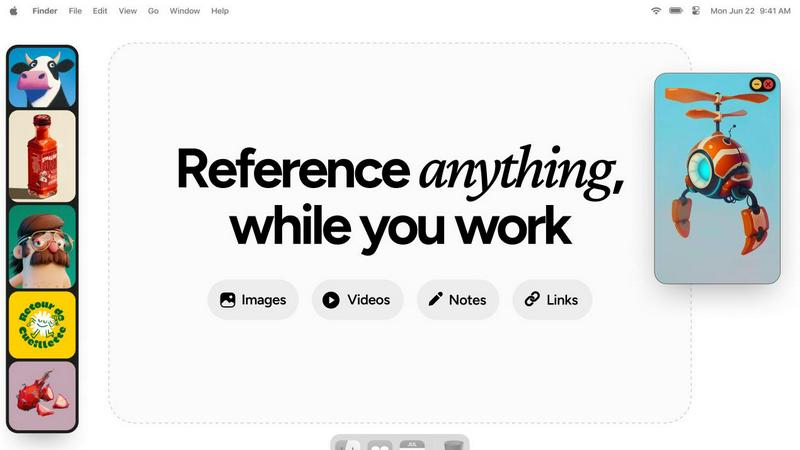
Refbox keeps all your images, videos, and notes at your fingertips for effortless reference while you create.
Last updated: February 28, 2026
Visual Comparison
documentorium

Refbox
Feature Comparison
documentorium
Guided Templates
documentorium offers a comprehensive library of over 200 guided templates tailored to various trades. This feature allows users to select the right document type—be it a quote, estimate, or work order—and fill out specialized fields that cater directly to their profession, enhancing relevance and accuracy.
Instant PDF Generation
The platform allows for the immediate creation of high-quality PDF documents once forms are completed. This means users can generate professional documentation without the need for formatting or additional editing, streamlining the entire process from creation to delivery.
Saved Document History
With documentorium, users can easily access their previously created documents. The platform saves your history, allowing you to pre-fill forms based on past entries, which saves time and reduces repetitive data entry for frequently used documents.
Simple Pricing Model
documentorium offers a straightforward pricing structure, providing full access to all documents and templates for a single annual fee. This eliminates confusion over multiple pricing tiers and ensures that users get everything they need for one price, making budgeting easy for service professionals.
Refbox
Floating Resizable Frames
Refbox offers floating frames that can be resized and positioned over any application. This ensures that your references remain visible and accessible, enhancing your workflow without disrupting your focus.
Infinite Canvas
With Refbox, users can enjoy an infinite canvas where they can view all their reference materials at once. This feature allows for quick comparisons and easy navigation through items, streamlining the creative process significantly.
Auto-Hide Functionality
The auto-hide feature allows users to minimize distractions by keeping the reference box hidden until needed. This ensures that creatives can maintain their focus on the task at hand without unnecessary interruptions.
GIF Playback and Pixel Rendering
Refbox supports GIF playback, allowing users to step through each frame for detailed analysis. Additionally, it offers pixel rendering for precise viewing of pixel art, ensuring that every detail is captured accurately.
Use Cases
documentorium
Generating Quotes
An electrician can quickly generate a professional quote for a client using documentorium's guided templates. By selecting the relevant fields and filling them out, the electrician can provide a clear, detailed estimate, enhancing client trust and improving the likelihood of securing the job.
Creating Work Orders
A plumber can utilize documentorium to create work orders on-site. With easy access to templates designed for plumbing services, the plumber can document tasks clearly and efficiently, ensuring all necessary information is captured and communicated to the team.
Managing Invoices
Contractors can streamline their invoicing process by using documentorium to create invoices that align with their specific services. This feature helps ensure that all charges are accurately represented and that clients receive clear and professional billing documents.
Developing Proposals
HVAC technicians can use documentorium to craft compelling proposals for clients needing system installations. With guided templates, they can highlight their expertise, outline project scopes, and present their pricing in a professional format that stands out to potential customers.
Refbox
Streamlined Moodboarding
Refbox is ideal for designers creating mood boards. It allows them to pin images and notes in an organized manner, making it easy to visualize concepts and themes for upcoming projects.
Enhanced 3D Modeling
3D artists can utilize Refbox to keep reference images and materials readily accessible. This capability helps streamline the modeling process, ensuring that inspiration is just a glance away while working in complex software.
Efficient Animation Workflow
Animators benefit from Refbox by having quick access to reference videos and notes. This facilitates a smoother workflow, allowing them to focus on timing and movement without interruptions from constant tab switching.
Product Design Prototyping
Product designers can use Refbox to pin sketches, images, and specifications all in one place. This organization aids in maintaining clarity and focus, especially during the prototyping phase where multiple references are often needed.
Overview
About documentorium
documentorium is a streamlined document engine designed specifically for tradespeople, such as electricians, plumbers, contractors, HVAC technicians, roofers, and other service professionals. The platform eliminates the hassle of starting from scratch by providing over 200 guided templates across 26 trade categories, enabling users to create essential business documents quickly and efficiently. The main value proposition of documentorium lies in its tailored approach; every document template is equipped with fields specifically designed for each trade, ensuring that users can fill out forms without encountering generic or irrelevant blanks. With documentorium, professionals can generate clean, print-ready PDFs in mere seconds. This not only saves valuable time but also enhances professionalism and consistency in documentation, allowing service providers to focus more on their core work rather than administrative tasks.
About Refbox
Refbox is an innovative floating reference application tailored for creative professionals who seek inspiration while they work. Designed for artists, designers, animators, and other creatives, Refbox allows users to pin images, GIFs, videos, and notes within resizable frames that float above their working applications. This unique feature eliminates the disruptive need for constant window switching, enabling users to maintain focus and enhance productivity. The primary value proposition of Refbox lies in its ability to provide instant access to a wealth of reference material without the clutter of multiple tabs and folders. Refbox is more than just a tool; it acts as a collaborative partner, empowering creatives to access their sources of inspiration effortlessly, thereby fostering a seamless workflow. Whether sketching, designing, or modeling, Refbox ensures that your creative resources are always within reach, making it an indispensable asset for professionals striving for excellence in their craft.
Frequently Asked Questions
documentorium FAQ
Can I cancel anytime?
Yes, you can cancel your documentorium subscription at any time directly from your account. Your access will remain active until the end of the billing period, ensuring you can continue using the service without penalties or lock-in requirements.
What happens when my trial ends?
When your trial period ends, your existing documents will still be available. To create new documents, you will need to activate your subscription, but rest assured that no data is deleted once the trial expires.
Do I lose my documents if I don't subscribe?
No, you will not lose your documents if you choose not to subscribe. All your documents will remain in your history, allowing you to view and download them at any time. Subscribing simply enables you to create and edit new documents.
What types of documents can I create?
documentorium allows you to create a wide variety of professional documents tailored to your trade, including quotes, estimates, invoices, work orders, bids, contracts, service reports, and more, all designed to meet the specific needs of service professionals.
Refbox FAQ
How does Refbox help improve productivity?
Refbox enhances productivity by providing instant access to references without the need for constant window switching. It keeps your creative resources organized and readily available, enabling you to focus on your work.
Can I use Refbox with any application?
Yes, Refbox is designed to float above any application, making it versatile and compatible with various creative software tools. This ensures that your references are always accessible, regardless of the task at hand.
Is there a limit to the number of references I can pin?
There is no set limit to the number of references you can pin in Refbox. You can create multiple collections and add as many items as you need, keeping your workspace organized and efficient.
Does Refbox support collaborative work?
While Refbox is primarily designed for individual use, it enhances the collaborative process by allowing users to keep shared references visible during team projects. This helps maintain a unified vision among team members.
Alternatives
documentorium Alternatives
documentorium is a robust document engine designed specifically for tradespeople such as electricians, plumbers, contractors, HVAC technicians, and roofers. This productivity tool simplifies the creation of professional business documents by offering over 200 guided templates tailored to specific trade needs. Users appreciate its ability to generate accurate and print-ready PDFs quickly without the hassle of starting from scratch. Many users seek alternatives to documentorium due to various factors such as pricing, feature sets, or compatibility with their preferred platforms. When evaluating alternatives, it's essential to consider the specific needs of your trade, the variety of templates available, user experience, and the overall efficiency of the document creation process. A suitable alternative should streamline your workflow and enhance productivity in generating essential business documents.
Refbox Alternatives
Refbox is an innovative floating reference app designed for creative professionals, enabling users to keep their images, videos, and notes accessible above their workspace. This tool helps artists, designers, and other creatives maintain focus by minimizing distractions related to window switching and resource searching. As a productivity and management tool, Refbox effectively enhances the creative workflow by providing instant access to essential references. Users often seek alternatives to Refbox due to various reasons, including pricing considerations, feature sets, and compatibility with their preferred platforms. When exploring alternatives, it is important to assess factors such as usability, the ability to customize frames or layouts, and the integration of note-taking capabilities. A thoughtful evaluation of these aspects ensures that the chosen tool aligns with individual needs and enhances collaborative efforts within creative teams.