Clinic Comply vs Quickfix AI
Side-by-side comparison to help you choose the right product.

Clinic Comply
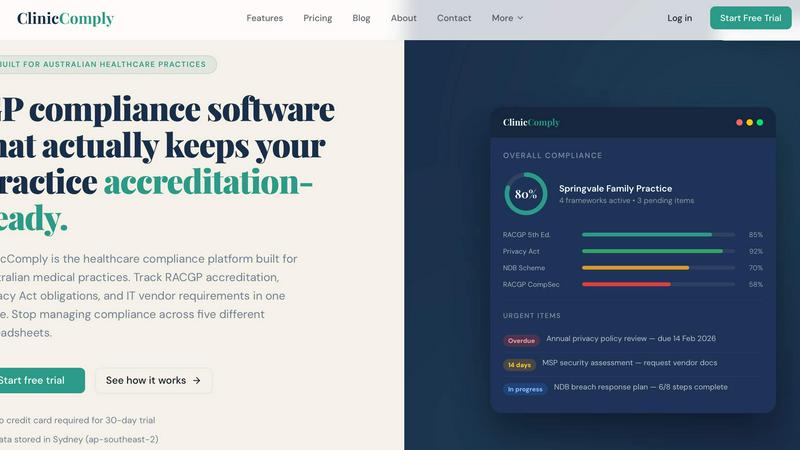
Clinic Comply simplifies compliance for Australian healthcare practices, unifying accreditation and vendor management in one seamless platform.
Last updated: March 19, 2026

Quickfix AI
Quickfix AI is your team's instant system diagnostics and AI explanation tool.
Last updated: March 1, 2026
Visual Comparison
Clinic Comply
Quickfix AI
Feature Comparison
Clinic Comply
RACGP Accreditation Tracking
Clinic Comply offers robust tracking of every criterion in the RACGP 5th Edition Standards. It includes guided checklists that are specifically built around the actual assessment criteria, ensuring practices can easily monitor their compliance status. Users can upload evidence documents and link them directly to checklist items, facilitating a seamless accreditation process.
Privacy Act and NDB Compliance
The platform ensures that medical practices can effectively manage their obligations under the Privacy Act 1988 and the Notifiable Data Breaches (NDB) Scheme. With integrated compliance tools, users can stay updated on their privacy requirements, track their progress, and ensure they are prepared for any audits or assessments.
IT Vendor Portal
Clinic Comply simplifies interactions with IT vendors through its dedicated portal. Instead of lengthy email exchanges, users can send secure upload links to vendors, allowing them to upload necessary documents directly. This feature ensures that all vendor-related compliance documents are stored in one place and linked to the appropriate checklist criteria.
Live Compliance Score
The platform provides a live compliance score that updates in real-time as checklist items are completed. This feature gives practices immediate visibility into their compliance status, allowing teams to identify areas needing attention and ensuring that they are always accreditation-ready.
Quickfix AI
Comprehensive One-Click System Scan
Quickfix AI performs a full diagnostic of your system in under a minute, gathering critical data on CPU, memory, GPU, storage health, battery cycles, security settings, and network performance. This unified report provides a complete picture of your system's health, eliminating the need to check multiple disparate tools and creating a single source of truth for collaborative analysis.
AI-Powered Explanations & Recommendations
The integrated AI assistant reads your full diagnostic report and answers your questions in clear, plain English. You can ask "Why is my Mac running slow?" and get a specific answer pinpointing resource-heavy applications. This feature bridges knowledge gaps within teams, allowing non-technical members to understand issues and technical members to get to the root cause faster.
Secure Remote Diagnostics with Sharing Codes
This team-oriented feature allows for seamless collaboration on troubleshooting. An IT support professional can generate a sharing link, which a remote user runs to create a unique code. The support team can then instantly view that user's diagnostic report, enabling efficient, guided problem-solving without requiring physical access to the machine.
Cross-Platform Compatibility
Quickfix AI is built for inclusive teamwork across different setups. It offers dedicated applications for both Windows and macOS systems. This ensures that whether your team uses a mix of personal and professional machines, everyone can participate in a unified diagnostic and optimization workflow, fostering better cross-platform system management.
Use Cases
Clinic Comply
Streamlining Accreditation Preparation
General practitioners can use Clinic Comply to streamline the preparation for accreditation visits. By accessing guided checklists and linked evidence documents, practices can ensure that all necessary requirements are met well before the assessor arrives.
Centralizing Compliance Documentation
Clinic managers can centralize all compliance documentation in one platform, eliminating the confusion of managing multiple spreadsheets and email threads. This ensures that all staff have access to the most current documents, making audits a smoother process.
Enhancing Team Collaboration
Healthcare administrators can enhance team collaboration by using Clinic Comply's features to assign tasks and deadlines related to compliance. This fosters a collaborative environment where all team members are aware of their responsibilities and progress is tracked transparently.
Improving Vendor Management
IT managers can significantly improve vendor management by utilizing the IT Vendor Portal. This allows for efficient communication regarding compliance-related documents, ensuring that all necessary paperwork is easily accessible and properly linked to compliance requirements.
Quickfix AI
Collaborative IT Support and Help Desks
IT teams can leverage Quickfix AI to scale their support efficiently. By using the sharing code feature, they can instantly diagnose issues on any user's machine remotely. The clear, AI-generated reports allow support agents to quickly understand problems and provide precise guidance, reducing resolution time and improving synergy between support and other departments.
Proactive System Maintenance for Teams
Departments can use Quickfix AI as a preventative tool to maintain collective productivity. Regular scans can identify potential issues like dwindling storage, high memory pressure, or outdated security settings before they cause widespread disruption. Teams can then work together to address these alerts, ensuring smooth, uninterrupted workflow for all members.
Empowering Non-Technical Employees
Quickfix AI democratizes system knowledge. Employees who aren't tech specialists can independently run a scan, ask the AI what's wrong, and often resolve simple issues themselves using the provided recommendations. This self-service capability reduces the burden on IT and empowers every team member to be a proactive part of maintaining their own digital workspace.
Performance Optimization for Tech Enthusiasts & Developers
Gamers, developers, and power users working on collaborative projects can use Quickfix AI to fine-tune their systems for maximum performance. By deeply analyzing CPU/GPU usage, memory allocation, and temperatures, teams can ensure their hardware is optimally configured for demanding tasks, leading to better synergy in project execution and resource management.
Overview
About Clinic Comply
Clinic Comply is an intuitive healthcare compliance platform specifically designed for Australian medical practices. This software addresses the complexities of healthcare compliance by providing a centralized hub for tracking essential requirements, such as RACGP accreditation, Privacy Act obligations, and IT vendor specifications. Clinic Comply eliminates the need for managing compliance through multiple spreadsheets, ensuring that all compliance documentation and progress are easily accessible in one location. It is tailored for general practitioners, clinic managers, and healthcare administrators, making it ideal for streamlining compliance processes. By utilizing Clinic Comply, medical practices can maintain accreditation readiness while saving valuable time and reducing the risk of errors in compliance management. This ultimately allows healthcare professionals to focus more on what matters most—delivering quality patient care.
About Quickfix AI
Quickfix AI is your collaborative partner for achieving system clarity and peak performance. It's an AI-powered diagnostics tool designed to demystify your computer's health for individuals and teams alike. By running a comprehensive, one-minute scan, Quickfix AI provides an instant, holistic view of your system's performance, security, and hardware status. The magic lies in its ability to translate complex technical data into plain-English insights and actionable recommendations through an integrated AI chat. This empowers everyone, from curious individuals to professional IT support teams, to work together effectively, diagnose issues swiftly, and optimize systems without needing deep technical expertise. Whether you're troubleshooting a slow machine solo or supporting a remote colleague, Quickfix AI fosters a synergistic approach to system management, ensuring everyone is on the same page and can contribute to a solution.
Frequently Asked Questions
Clinic Comply FAQ
What makes Clinic Comply different from other compliance tools?
Clinic Comply is specifically designed for Australian healthcare practices, incorporating local standards and regulations such as RACGP and the Privacy Act. Unlike generic compliance tools, it provides tailored features to meet the unique needs of medical practices.
How does the live compliance score work?
The live compliance score updates automatically as checklist items are completed. This real-time feedback allows practices to monitor their compliance status continuously, helping them stay prepared for accreditation assessments.
Can I try Clinic Comply before committing?
Yes, Clinic Comply offers a 30-day free trial with no credit card required. This allows potential users to explore the platform and understand how it can benefit their practice before making a financial commitment.
Is my data secure with Clinic Comply?
Absolutely. Clinic Comply stores data securely in Sydney (ap-southeast-2), ensuring compliance with Australian data protection laws. The platform prioritizes user privacy and data security, making it a reliable choice for medical practices.
Quickfix AI FAQ
Is Quickfix AI free?
Yes, Quickfix AI offers a free version that includes the core system scan and AI-powered insights. This allows individuals and teams to start diagnosing and understanding their systems immediately. For advanced features tailored for enterprise use or more frequent team-based diagnostics, check the Pricing page for detailed plan information.
Is my data secure?
Absolutely. Your system's diagnostic data is handled with the utmost security and privacy. Scans are processed with a focus on your confidentiality. We encourage you to review our detailed Privacy Policy and Data Processing Agreement (DPA) to understand exactly how your information is protected and used.
Do I need technical knowledge?
Not at all. Quickfix AI is specifically designed for users of all technical backgrounds. The AI assistant explains everything in plain English, and the report presents information in a clear, dashboard format. This makes it easy for everyone on a team to collaborate on system health, regardless of their individual expertise.
How does the sharing code work?
The sharing code enables secure, remote teamwork. The person providing help generates a unique link from their Quickfix AI dashboard and sends it to the user needing support. That user runs the scan agent via the link, which produces a code. When entered back into the helper's dashboard, it securely displays the remote system's diagnostic report for collaborative troubleshooting.
Alternatives
Clinic Comply Alternatives
Clinic Comply is an all-in-one compliance platform designed specifically for Australian healthcare providers. It streamlines the intricate processes of accreditation and vendor management, making it a valuable tool for general practitioners, clinic managers, and healthcare administrators. By centralizing compliance documentation, Clinic Comply helps users stay organized and focused on patient care. Users often seek alternatives to Clinic Comply for various reasons, including pricing considerations, feature sets, or specific platform needs that may better suit their operational requirements. When choosing an alternative, it's essential to evaluate the ease of use, scalability, and the breadth of features offered, ensuring the solution aligns with the unique demands of your healthcare practice.
Quickfix AI Alternatives
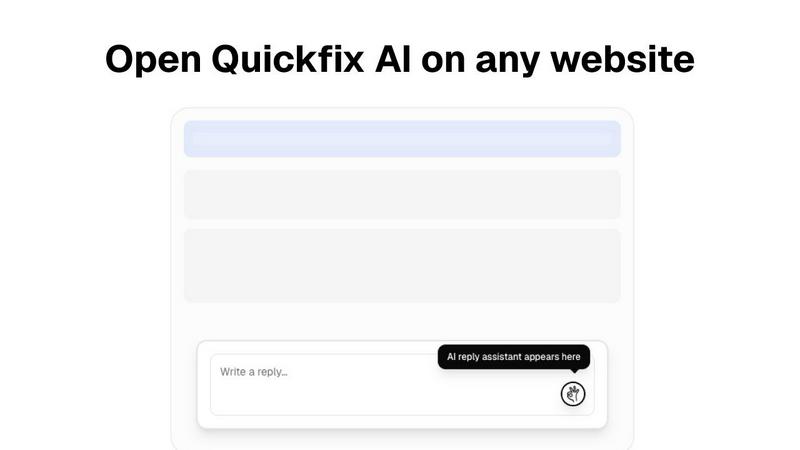
Quickfix AI is a productivity-focused browser extension that uses artificial intelligence to instantly generate contextual replies and streamline communication across various websites. It belongs to the growing category of AI-powered writing and productivity tools designed to save time and enhance digital interactions. Users often explore alternatives for several reasons. Needs vary widely; some may require a different pricing model or a free tier, while others might seek specific integrations, more advanced features, or a tool that operates as a standalone application rather than a browser extension. The ideal solution depends heavily on an individual's or team's unique workflow and communication channels. When evaluating other options, it's wise to consider core factors like the depth of contextual understanding, the range of supported platforms and languages, data privacy policies, and overall ease of use. The goal is to find a tool that fosters seamless collaboration, allowing you and your team to communicate more effectively without disrupting your natural workflow.