FLUX.2 [max] Image Generator vs Postproxy
Side-by-side comparison to help you choose the right product.
![FLUX.2 [max] Image Generator logo](https://unitelist.com/images/flux2max-app-icon.jpg)
FLUX.2 [max] Image Generator
FLUX.2 [max] is your collaborative AI image generator, delivering production-ready visuals with prompt galleries and seamless editing workflows.
Last updated: March 26, 2026

Postproxy
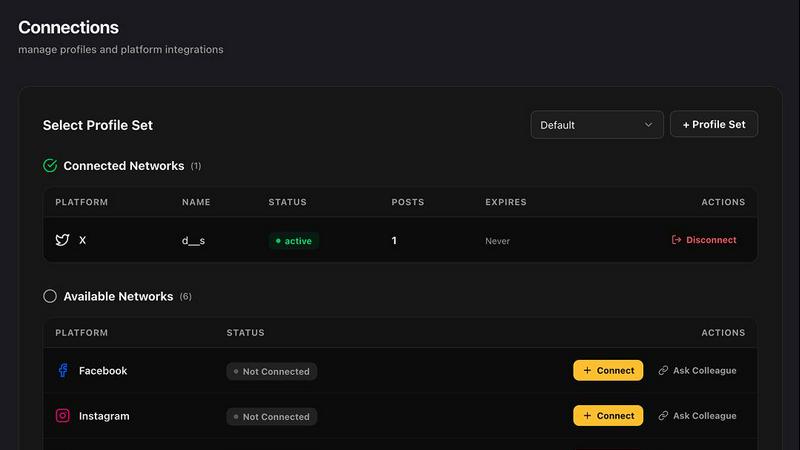
Postproxy simplifies social media publishing by unifying multiple platforms into one reliable API for seamless.
Last updated: February 28, 2026
Visual Comparison
FLUX.2 [max] Image Generator
![FLUX.2 [max] Image Generator screenshot](https://unitelist.com/images/flux2max-app-screenshot.jpg)
Postproxy
Feature Comparison
FLUX.2 [max] Image Generator
Searchable Prompt Gallery & Category Hubs
This feature provides a vast, organized library of successful image prompts across categories like PORTRAIT, PRODUCT, CONCEPT, and SCENERY. It acts as a collaborative reference hub, allowing teams to find inspiration, understand effective prompt patterns, and jumpstart projects with proven starting points. This shared resource ensures everyone is aligned on style and quality, turning visual research into actionable creative briefs instantly.
Iterative Editing & Advanced Workflows
FLUX.2 [max] excels in non-destructive, iterative editing, allowing creators to refine lighting, adjust composition, or clean up details while maintaining image stability. This is complemented by specialized workflows for spatial reasoning (controlling perspective and camera angles), precise retexturing of objects, and exceptional text rendering in any style. This suite of tools enables a team to polish an image to professional standards through a cooperative, step-by-step refinement process.
Multi-Model Generator with Flexible Controls
The live generator supports a wide array of AI models, including FLUX.2 [max], Gemini 2.5 Flash, and others, giving teams the flexibility to choose the best tool for a specific task. Coupled with customizable canvas sizes (Square, Wide, Portrait, etc.), this feature allows for the creation of assets tailored to any platform or format, from social media graphics to cinematic wide shots, fostering adaptability in collaborative projects.
Character Consistency Engine
A standout feature for narrative and branding work, this engine allows teams to create and edit characters with unmatched consistency across different images, scenes, and styles. It preserves facial features, proportions, and visual identity, making it possible to develop a character sheet or maintain a brand mascot's look throughout an entire campaign, ensuring cohesive storytelling and brand recognition.
Postproxy
Unified API for Multiple Platforms
Postproxy provides a single API that replaces the need for individual integrations with various social media platforms. This unification streamlines the publishing process, allowing users to send requests to multiple networks with ease.
Automated Content Adaptation
The platform automatically transforms content to meet the unique requirements of each social media platform. This feature ensures that users do not have to manually adjust their posts for different formats, media limits, or validation rules, saving significant time and effort.
Robust Error Handling
Postproxy is designed to handle operational failures gracefully. It integrates automatic retries, rate limit management, and quota awareness, ensuring that users face fewer disruptions in their publishing workflows, thus enhancing reliability.
Explicit Publish States
With Postproxy, users can easily track the status of their publishing requests. The system provides clear feedback on what has succeeded, what has failed, and the reasons behind any failures, eliminating the need for manual checks and interventions.
Use Cases
FLUX.2 [max] Image Generator
Product Marketing & Photography
Teams can generate highest-quality, marketplace-ready product photos that look polished and professional. By using reference photos and iterative editing, they can create consistent, stylized shots for e-commerce, advertisements, and packaging, significantly speeding up the asset production cycle while maintaining a high bar for visual quality.
Concept Art & Filmmaking
Ideal for pre-production, this use case involves creating cinematic texture and richly stylized frames for storyboards, environment concepts, and character design. The spatial reasoning and dramatic lighting capabilities help directors and concept artists visualize complex scenes and establish a unified visual language early in the collaborative filmmaking process.
Branding & Logo Design
Teams can take an existing logo as a reference and generate stunning, brand-consistent design variations. This is perfect for exploring thematic styles, creating branded content, or developing visual identities across different media, allowing for creative experimentation that stays true to the core brand elements.
Commercial & Lifestyle Imagery
From cinematic food shots and fashion editorials to workspace moods and lifestyle scenes, FLUX.2 [max] enables the rapid creation of on-brand commercial imagery. The prompt gallery provides immediate direction for style and composition, helping marketing and content teams produce engaging visual content for campaigns, websites, and social media efficiently.
Postproxy
Streamlined Social Media Management
Businesses can use Postproxy to manage their social media presence across multiple platforms from a single interface. This capability reduces the complexity of handling various accounts and simplifies the workflow for social media teams.
Automated Content Publishing
Marketing teams can automate the posting of AI-generated content. By integrating Postproxy into their existing pipelines, they can ensure timely and consistent publishing without the need for manual oversight.
Simplified Account Management
Postproxy allows organizations with numerous social media accounts to manage permissions and access effectively. This feature is crucial for companies with multiple brands or regional accounts, streamlining account control.
Scalable Publishing Solutions
As businesses grow, their publishing needs can become more complex. Postproxy facilitates scaling operations by allowing users to publish large volumes of content without adding complexity to their processes, making it ideal for high-demand environments.
Overview
About FLUX.2 [max] Image Generator
FLUX.2 [max] Image Generator is a comprehensive AI-powered creative suite designed to transform visual research into production-ready imagery. It moves beyond simple text-to-image generation by integrating a searchable prompt gallery, specialized category hubs, and a live generator into a single, cohesive workflow. This synergy is built for professional creators, marketers, and designers who demand not just high-quality outputs but also efficiency and precision in their process. The platform's core value proposition lies in its ability to provide clear creative direction through real-world examples and then offer the advanced tools needed to execute and refine those ideas. With support for multiple AI models, including its flagship FLUX.2 [max], and a focus on professional workflows like iterative editing, character consistency, and advanced text rendering, it serves as an indispensable partner for teams working on product photography, concept art, branding, and cinematic production. It’s about reducing guesswork and wasted iterations, enabling a collaborative flow from inspiration to final asset.
About Postproxy
Postproxy is an innovative solution designed to simplify and unify social media publishing across multiple platforms, such as Instagram, Facebook, YouTube, LinkedIn, and X. It provides a single API endpoint that automates the challenges associated with platform-specific publishing, including OAuth management, rate limiting, retries, content adaptation, and analytics. This product is particularly beneficial for developers and automation enthusiasts using tools like n8n, Zapier, and CI/CD pipelines. By transforming the publishing process into a predictable infrastructure, Postproxy allows users to generate AI-driven content, route it according to specific rules, and publish at scale without the burden of manual adjustments. With a free plan available, it accommodates businesses of all sizes, making it easier to scale as their needs grow. Additionally, the Managing Control Panel (MCP) offers a user-friendly interface to manage publishing activities seamlessly.
Frequently Asked Questions
FLUX.2 [max] Image Generator FAQ
What makes FLUX.2 [max] different from other AI image generators?
FLUX.2 [max] distinguishes itself by being a complete workflow platform, not just a generator. It combines a searchable prompt gallery and category hubs for inspiration with advanced, production-ready editing tools like iterative refinement, character consistency, and spatial reasoning. This integrated approach is designed to reduce wasted iterations and provide clear paths from research to final, polished assets.
How does the Character Consistency feature work?
The Character Consistency engine uses advanced AI to lock in the visual identity of a character—including facial features, proportions, and style—across multiple generated images. You start with a reference image of your character, and the model will maintain those core attributes even when changing the scene, outfit, or action, which is essential for storytelling and branding projects.
Can I use FLUX.2 [max] for creating images with text?
Yes, advanced text rendering is a key strength. FLUX.2 [max] excels at integrating text into images, adapting seamlessly to various styles like modern typography, classic lettering, handwritten scripts, or dynamic 3D effects. This makes it highly effective for creating posters, branded graphics, logos, and any imagery where legible, stylized text is required.
What is the best way to start using the platform for a new project?
The platform is designed for a prompt-first workflow. The most effective path is to begin in the Prompt Gallery or relevant Category Hub (e.g., PRODUCT, CONCEPT) to find inspiration and see examples of successful prompts. This research-led approach provides a strong creative direction, which you can then bring to life and refine using the live Generator and its iterative editing tools.
Postproxy FAQ
What social media platforms does Postproxy support?
Postproxy currently supports major platforms including Instagram, Facebook, YouTube, LinkedIn, and X, allowing users to publish content across multiple channels effortlessly.
How does Postproxy handle platform-specific failures?
Postproxy is designed to manage operational failures by implementing automatic retries, rate limit handling, and clear reporting on publish states. This ensures a reliable publishing experience.
Is there a free plan available for Postproxy?
Yes, Postproxy offers a free plan, allowing users to get started without any financial commitment. This plan is ideal for individuals and small businesses looking to explore the platform's capabilities.
How can I integrate Postproxy into my existing workflows?
Integrating Postproxy is straightforward. Users can create an account, obtain an API key, connect their social media accounts, and start publishing content via the unified API, making it easy to include in existing automation setups.
Alternatives
FLUX.2 [max] Image Generator Alternatives
FLUX.2 [max] Image Generator is a powerful AI tool in the design and image generation category. It goes beyond simple creation by offering a collaborative hub with a prompt gallery and professional editing workflows, helping teams turn visual research into final assets. Teams often explore alternatives for various reasons. This could be due to budget considerations, the need for different feature sets, or specific platform integrations that better suit their existing collaborative environment. Finding the right tool fit is crucial for seamless project synergy. When evaluating other options, consider how well they support team-based creation. Look for tools that facilitate shared inspiration, maintain consistency across assets, and offer production-ready editing capabilities. The goal is to find a platform that enhances your team's collective workflow, not just individual output.
Postproxy Alternatives
Postproxy is a powerful tool designed for developers and automators, providing a unified API for seamless publishing across multiple social media platforms, including Instagram, Facebook, YouTube, LinkedIn, and X. By streamlining the complexities of social media management, Postproxy facilitates a more efficient publishing process, making it easier for users to manage their social media presence from a single endpoint. Users often seek alternatives to Postproxy for various reasons, such as exploring different pricing models, evaluating feature sets, or meeting specific platform integration requirements. When choosing an alternative, it’s essential to consider factors such as ease of use, scalability, integration capabilities, and the level of automation offered. Identifying the core needs of your publishing strategy will help ensure that the chosen solution aligns with your goals.