JobHustler vs PDF Compiler
Side-by-side comparison to help you choose the right product.

JobHustler
Instantly create tailored resumes and cover letters with AI, no signup required, for every job application.
Last updated: March 4, 2026

PDF Compiler
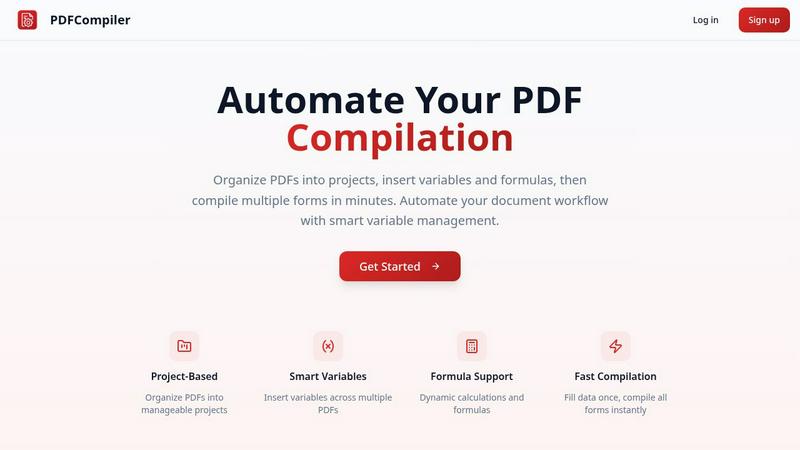
Effortlessly automate your PDF workflow by entering data once to generate multiple documents in seconds.
Last updated: February 28, 2026
Visual Comparison
JobHustler

PDF Compiler
Feature Comparison
JobHustler
AI-Powered Tailoring
JobHustler employs advanced AI algorithms to analyze job descriptions and generate tailored resumes and cover letters. This feature ensures that each document aligns with employer expectations, enhancing the likelihood of passing ATS filters.
ATS-Friendly Formatting
Understanding the significance of ATS in recruitment, JobHustler optimizes the formatting of resumes and cover letters. This attention to detail helps ensure that documents are easily readable by automated systems, increasing the chances of getting noticed by hiring managers.
Customizable Cover Letters
With JobHustler, users can create personalized cover letters that reflect the tone and culture of the company they are applying to. This feature allows candidates to make a strong impression by showcasing their enthusiasm and fit for the role.
Role-Specific Bullet Points
JobHustler generates impactful, role-specific bullet points that highlight relevant skills and experiences. By focusing on the requirements of the job, this feature helps users present their qualifications in a compelling manner.
PDF Compiler
Configurable Fields
With PDF Compiler, users can define various field types such as dates, variables, and selections, as well as incorporate Excel-style formulas and account data references. This flexibility allows for tailored document creation that meets specific project needs, enhancing overall accuracy and efficiency.
Minimal Input
The software is designed for efficiency; users only need to enter core data once, and PDF Compiler automatically populates all linked documents. This feature minimizes the chances of errors and ensures that all documents maintain consistency in data entry.
Data Linking
Changes made to any input field are instantly reflected across all PDFs within a project. This data linking capability ensures that all documents are always up-to-date and reduces the risk of discrepancies, making it easier to manage and share documents effectively.
Automated Workflows
PDF Compiler enables users to generate complete document sets in just minutes. With its dynamic calculations and formatting, it transforms the way teams compile forms, allowing for rapid document generation that meets tight deadlines without sacrificing quality.
Use Cases
JobHustler
Job Seekers
Individuals looking for jobs can utilize JobHustler to quickly create professional documents that are tailored to each job application, saving time and increasing their chances of standing out to employers.
Career Changers
Those transitioning to a new field can leverage JobHustler to craft resumes that emphasize transferable skills and relevant experiences, making it easier to pivot into a different career path.
Recent Graduates
New graduates entering the job market can benefit from JobHustler by generating polished resumes and cover letters that highlight their education and any internships or volunteer work, helping them compete with more experienced candidates.
Professionals Seeking Advancement
Established professionals aiming for promotions or new positions can use JobHustler to update their application materials, ensuring that their documents reflect their current skills, achievements, and aspirations effectively.
PDF Compiler
Tender and Proposal Documentation
Organizations frequently require precise and consistent documentation for tenders and proposals. PDF Compiler simplifies this process by enabling teams to create comprehensive documentation quickly, ensuring that all necessary data is accurately represented across multiple documents.
Financial and Administrative Reports
Finance and administration departments often handle various reports that require repetitive data entry. PDF Compiler automates this process, allowing users to generate detailed reports efficiently, reducing time spent on manual input and increasing data accuracy.
Client Contracts
Creating and managing client contracts often involves multiple documents with shared data. PDF Compiler streamlines the contract creation process, ensuring that essential information is consistently applied across all related documents, thereby enhancing the professionalism of client interactions.
Invoice Generation
For businesses that deal with a high volume of invoices, PDF Compiler automates the repetitive entry of client information and transaction details. This leads to faster invoice processing times and fewer errors, ultimately improving cash flow management and client satisfaction.
Overview
About JobHustler
JobHustler is an innovative AI-powered tool designed to streamline the process of creating professional resumes and cover letters. It caters to job seekers of all levels, from recent graduates to seasoned professionals, by enabling them to generate tailored application documents in mere minutes. By simply pasting a job description, users can receive customized resumes and cover letters that align closely with the specific requirements and preferences of potential employers. JobHustler excels in producing role-specific bullet points, optimizing formatting for Applicant Tracking Systems (ATS), and refining language for clarity and impact. The platform requires no account setup, and its free uses regenerate over time, making it accessible for users who want to experiment and enhance their documents. In today's competitive job market, JobHustler empowers candidates by making the professional document creation process quicker, clearer, and more effective, thus increasing their chances of landing interviews.
About PDF Compiler
PDF Compiler is a revolutionary tool designed to streamline the tedious process of completing PDF forms across multiple documents. By automating form completion, it significantly reduces the need for manual data entry, ensuring that your submissions are consistent and free from errors. This product is ideal for professionals in various fields such as finance, administration, and project management who regularly deal with multi-document workflows. With PDF Compiler, users enter essential information just once, and the software takes care of populating all linked documents automatically. This not only saves time but also enhances productivity by allowing teams to focus on more strategic tasks rather than repetitive data entry. The main value proposition of PDF Compiler lies in its ability to handle complex data propagation, formulas, and field references seamlessly across an entire set of documents, making it an essential tool for anyone looking to optimize their PDF workflow.
Frequently Asked Questions
JobHustler FAQ
How does JobHustler ensure my resume is ATS-friendly?
JobHustler optimizes formatting and language to ensure compatibility with Applicant Tracking Systems. It focuses on using standard layouts and keywords that ATS algorithms prioritize, increasing the chances of your resume being viewed by hiring managers.
Can I generate multiple resumes and cover letters?
Yes, JobHustler offers a credit system where you can generate one resume and one cover letter per purchase. If you need more, you can explore additional plans for unlimited access.
Is there a need for account setup to use JobHustler?
No, JobHustler does not require any account setup. You can start generating your resumes and cover letters immediately, making it a hassle-free experience for users.
What types of tones can I choose for my cover letters?
JobHustler provides five different tones to choose from, allowing you to select the one that best fits the company's culture or the specific job you are applying for, ensuring a personalized touch in your application.
PDF Compiler FAQ
What types of documents can I compile with PDF Compiler?
PDF Compiler supports a wide range of documents, including proposals, contracts, reports, and invoices. Its flexibility makes it suitable for any multi-document workflow requiring accurate data entry.
Is there a limit to the number of PDFs I can compile at once?
No, PDF Compiler is designed to handle multiple PDFs within a single project. You can upload and compile as many documents as needed, streamlining your workflow without restrictions.
Do I need technical skills to use PDF Compiler?
Not at all. PDF Compiler is user-friendly and designed for individuals without technical expertise. Its intuitive interface allows users to configure fields and generate documents with ease.
Can I test PDF Compiler before committing to a subscription?
Yes, PDF Compiler offers a demo with sample documents that allows users to experience the automated compilation process at no cost. This enables you to assess its features and capabilities before signing up for a full account.
Alternatives
JobHustler Alternatives
JobHustler is an innovative tool designed to streamline the job application process by generating tailored resumes and cover letters in just minutes. As part of the productivity and management category, it leverages AI technology to create professional, ATS-friendly documents that reflect the specific requirements of job descriptions. Users often seek alternatives due to various reasons such as pricing, feature sets, or platform compatibility that better align with their individual needs or preferences. When selecting an alternative to JobHustler, it's important to consider several factors. Evaluate the ease of use, the quality of the generated documents, and whether the tool offers features that cater to your unique job search requirements. Additionally, look for options that provide flexibility, such as no account setup and the ability to generate documents quickly, to ensure a seamless and efficient experience in your job application journey.
PDF Compiler Alternatives
PDF Compiler is an innovative tool designed for automating PDF form completion, making it a standout solution within the productivity and management category. It allows users to enter data once and have it populate multiple PDFs instantly, streamlining workflows and reducing manual errors. Given its unique capabilities, users often seek alternatives due to factors such as pricing, feature sets, compatibility with existing platforms, or specific functional needs that may not be fully met by PDF Compiler. When searching for an alternative, it's essential to consider the specific features that align with your workflow requirements. Look for solutions that offer robust data linking, customizable fields, and efficient automation to ensure you maintain accuracy and save time. Additionally, assessing user experience, customer support, and integration with other tools can significantly impact your decision-making process.