
Never Drop vs Refbox
Side-by-side comparison to help you choose the right product.

Never Drop
NeverDrop helps your team instantly capture event leads and send AI-drafted follow-ups together.
Last updated: February 28, 2026

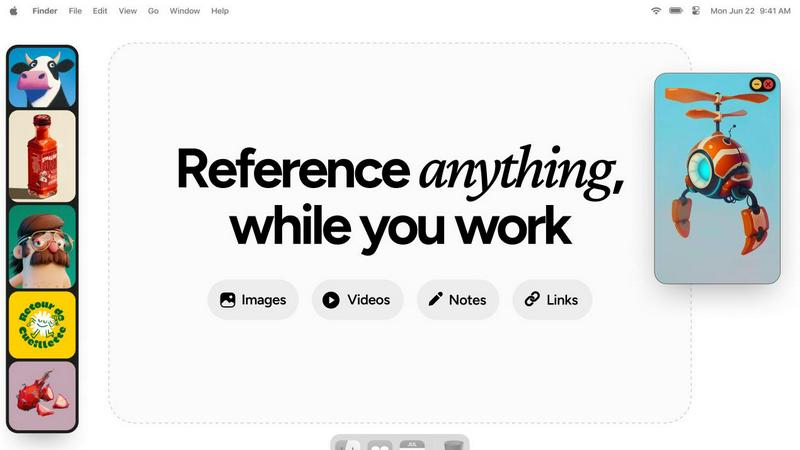
Refbox keeps all your images, videos, and notes at your fingertips for effortless reference while you create.
Last updated: February 28, 2026
Visual Comparison
Never Drop

Refbox
Feature Comparison
Never Drop
Instant AI-Powered Card Scanning
Never Drop streamlines the initial contact capture by allowing your team to simply snap a photo of any business card. Our advanced AI-powered Optical Character Recognition (OCR) instantly and accurately extracts every critical detail—name, company, title, phone number, and email—eliminating manual data entry. This shared starting point ensures clean, consistent data for the entire team to build upon, saving valuable time and preventing errors from the very first interaction.
Intelligent Contact Enrichment & Verification
Business cards often lack direct contact information. Never Drop strengthens your team's collective intelligence by automatically finding and verifying professional work emails using just the contact's name and company. This eliminates guesswork and manual LinkedIn searches, providing every team member with a complete, enriched contact profile that’s ready for immediate action and seamless integration into your shared CRM pipeline.
Context-Aware AI Follow-Up Drafting
Based on the unique voice notes or text context recorded by your team member after a conversation, Never Drop’s AI generates a personalized follow-up email draft. It moves beyond generic templates by incorporating the specific discussion points and tone from the interaction. This collaborative feature ensures follow-ups feel genuinely personal and relevant, reflecting a unified team approach to engagement that significantly increases conversion potential.
Unified Team Workspace & CRM Sync
Never Drop provides a central dashboard where your entire team can organize scans by event, reassign leads between reps, and track collective activity. This fosters alignment and ensures nothing falls through the cracks between team members. With seamless integration into popular CRMs like HubSpot, every enriched lead and its context is automatically synced, keeping your entire sales pipeline clean, organized, and ready for collaborative follow-through.
Refbox
Floating Resizable Frames
Refbox offers floating frames that can be resized and positioned over any application. This ensures that your references remain visible and accessible, enhancing your workflow without disrupting your focus.
Infinite Canvas
With Refbox, users can enjoy an infinite canvas where they can view all their reference materials at once. This feature allows for quick comparisons and easy navigation through items, streamlining the creative process significantly.
Auto-Hide Functionality
The auto-hide feature allows users to minimize distractions by keeping the reference box hidden until needed. This ensures that creatives can maintain their focus on the task at hand without unnecessary interruptions.
GIF Playback and Pixel Rendering
Refbox supports GIF playback, allowing users to step through each frame for detailed analysis. Additionally, it offers pixel rendering for precise viewing of pixel art, ensuring that every detail is captured accurately.
Use Cases
Never Drop
High-Volume Trade Show Lead Management
For sales teams navigating bustling trade show floors, Never Drop is indispensable. It allows reps to quickly scan dozens of cards, add quick voice memos about each conversation, and have personalized follow-ups drafted before they even leave the booth. This coordinated speed ensures your entire team capitalizes on the warmest leads first, dramatically increasing your show's return on investment.
Conference Networking and Follow-Up
During multi-day conferences, it’s easy to forget key details from early meetings. With Never Drop, your team can capture leads and context on the go. Organizing contacts by session or day helps maintain clarity, and sending tailored follow-ups while the discussion is fresh ensures your company stands out in a crowded post-event inbox.
Streamlining Team-Based Sales Dinners
After a group business dinner or networking event, recalling who spoke to which prospect can be chaotic. Never Drop allows each team member to capture their own conversations. The shared workspace then lets a manager review all captured leads and context, ensuring appropriate follow-up assignments and a cohesive strategy from the entire team.
Accelerating Partner and Referral Intake
When meeting potential partners or gathering referrals at events, swift and professional follow-up is key to building trust. Never Drop enables your team to not only capture their details but also immediately send a personalized email referencing your mutual connection or discussion point, demonstrating professionalism and a commitment to collaborative synergy from the very first touchpoint.
Refbox
Streamlined Moodboarding
Refbox is ideal for designers creating mood boards. It allows them to pin images and notes in an organized manner, making it easy to visualize concepts and themes for upcoming projects.
Enhanced 3D Modeling
3D artists can utilize Refbox to keep reference images and materials readily accessible. This capability helps streamline the modeling process, ensuring that inspiration is just a glance away while working in complex software.
Efficient Animation Workflow
Animators benefit from Refbox by having quick access to reference videos and notes. This facilitates a smoother workflow, allowing them to focus on timing and movement without interruptions from constant tab switching.
Product Design Prototyping
Product designers can use Refbox to pin sketches, images, and specifications all in one place. This organization aids in maintaining clarity and focus, especially during the prototyping phase where multiple references are often needed.
Overview
About Never Drop
In the high-energy, fast-paced world of sales events, the synergy between capturing a lead and acting on it is critical. Never Drop is the collaborative platform designed to unite your sales team around this single mission: transforming every handshake into a closed deal. Built specifically for sales professionals at trade shows, conferences, and networking events, Never Drop eliminates the friction and follow-up fatigue that cause valuable leads to go cold. The platform empowers your team to work together seamlessly, scanning a business card, enriching the contact with immediate voice or text context about the conversation, and generating a personalized, AI-drafted follow-up email—all within two minutes. By ensuring that every team member can contribute context and act swiftly, Never Drop keeps your entire pipeline organized, synchronized with your CRM, and primed for collective action. It’s more than a tool; it’s a shared system that amplifies your team's efforts, ensuring no lead is ever dropped and every opportunity is pursued with coordinated precision.
About Refbox
Refbox is an innovative floating reference application tailored for creative professionals who seek inspiration while they work. Designed for artists, designers, animators, and other creatives, Refbox allows users to pin images, GIFs, videos, and notes within resizable frames that float above their working applications. This unique feature eliminates the disruptive need for constant window switching, enabling users to maintain focus and enhance productivity. The primary value proposition of Refbox lies in its ability to provide instant access to a wealth of reference material without the clutter of multiple tabs and folders. Refbox is more than just a tool; it acts as a collaborative partner, empowering creatives to access their sources of inspiration effortlessly, thereby fostering a seamless workflow. Whether sketching, designing, or modeling, Refbox ensures that your creative resources are always within reach, making it an indispensable asset for professionals striving for excellence in their craft.
Frequently Asked Questions
Never Drop FAQ
How does Never Drop ensure follow-up emails sound personal?
Never Drop’s AI drafts emails based on the specific voice notes or text context you provide about your conversation. It uses this unique information—like discussed topics, pain points, or next steps—to generate a draft that reflects the actual interaction, not a generic template. You can then review and tweak it to perfectly match your tone, ensuring every email feels authentically personal.
What happens to the business card images after scanning?
Your data security is a priority. Never Drop is built by SCOPEO, a French company. Business card images are used solely by our AI for the purpose of contact extraction. They are not shared with third parties. All data is hosted in the EU in compliance with GDPR regulations and is encrypted both in transit and at rest.
Can multiple team members use one Never Drop account?
Yes, Never Drop is built for team collaboration. The platform includes a unified workspace dashboard where you can organize scans by event, view team activity, and reassign leads between different sales representatives. This ensures everyone is aligned and no lead is missed due to handoff friction.
Which CRM systems does Never Drop integrate with?
Never Drop currently offers direct integration with HubSpot for pushing enriched contact profiles and conversation context directly into your sales pipeline. It also integrates with Gmail, allowing you to send your AI-drafted follow-up emails directly from your own email address. Additional CRM integrations are planned for future development.
Refbox FAQ
How does Refbox help improve productivity?
Refbox enhances productivity by providing instant access to references without the need for constant window switching. It keeps your creative resources organized and readily available, enabling you to focus on your work.
Can I use Refbox with any application?
Yes, Refbox is designed to float above any application, making it versatile and compatible with various creative software tools. This ensures that your references are always accessible, regardless of the task at hand.
Is there a limit to the number of references I can pin?
There is no set limit to the number of references you can pin in Refbox. You can create multiple collections and add as many items as you need, keeping your workspace organized and efficient.
Does Refbox support collaborative work?
While Refbox is primarily designed for individual use, it enhances the collaborative process by allowing users to keep shared references visible during team projects. This helps maintain a unified vision among team members.
Alternatives
Never Drop Alternatives
Never Drop is a powerful lead-capture and follow-up automation tool in the productivity and management category. It's designed to help sales teams work together more effectively by instantly digitizing contacts and generating personalized outreach, ensuring no promising conversation is forgotten after a networking event or conference. Teams often explore alternatives for various strategic reasons. This could be due to specific budget constraints, the need for different feature sets like deeper analytics or unique integrations, or platform compatibility requirements that better align with their existing tech stack. It's a natural part of finding the perfect collaborative fit for your team's workflow. When evaluating other options, focus on how a tool enhances your team's synergy. Key considerations include the accuracy of data capture, the quality and customization of automated follow-ups, and how seamlessly a new solution integrates with your team's current CRM and communication platforms to maintain a unified pipeline.
Refbox Alternatives
Refbox is an innovative floating reference app designed for creative professionals, enabling users to keep their images, videos, and notes accessible above their workspace. This tool helps artists, designers, and other creatives maintain focus by minimizing distractions related to window switching and resource searching. As a productivity and management tool, Refbox effectively enhances the creative workflow by providing instant access to essential references. Users often seek alternatives to Refbox due to various reasons, including pricing considerations, feature sets, and compatibility with their preferred platforms. When exploring alternatives, it is important to assess factors such as usability, the ability to customize frames or layouts, and the integration of note-taking capabilities. A thoughtful evaluation of these aspects ensures that the chosen tool aligns with individual needs and enhances collaborative efforts within creative teams.