
LuxSign vs Refbox
Side-by-side comparison to help you choose the right product.

LuxSign simplifies document signing with secure, legally compliant electronic signatures, all hosted in Luxembourg.
Last updated: February 28, 2026

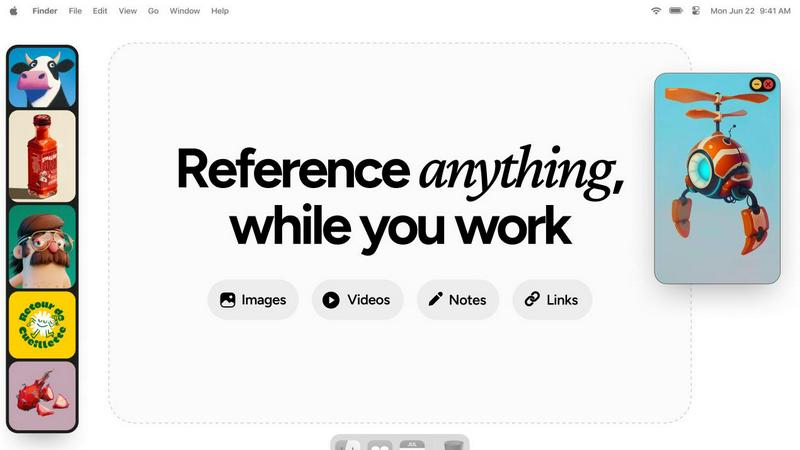
Refbox keeps all your images, videos, and notes at your fingertips for effortless reference while you create.
Last updated: February 28, 2026
Visual Comparison
LuxSign

Refbox
Feature Comparison
LuxSign
Multiple Signature Methods
LuxSign offers various signature methods to accommodate the preferences of all users. You can draw your signature using a mouse, type your name, or even upload an image of your signature. This flexibility makes it easy to customize the signing experience, including the option to add custom initials for quick document signing.
Advanced Security
Security is paramount with LuxSign. The platform utilizes industry-standard encryption to protect your documents during upload, storage, and transmission. In addition, all documents are stored on secure servers in Luxembourg, complying with EU data protection regulations and ensuring your data remains safe from unauthorized access.
Collaboration Workspaces
LuxSign provides collaboration workspaces that allow teams to work together seamlessly. You can create shared spaces for organizing documents, managing member access, and collaborating on signing workflows. This feature enhances team cooperation and ensures everyone is on the same page throughout the signing process.
Complete Audit Trail
With LuxSign, every action taken on a document is logged with detailed timestamps, IP addresses, and signer information. This comprehensive audit trail is essential for compliance and verification, giving you peace of mind that every transaction is transparent and accountable.
Refbox
Floating Resizable Frames
Refbox offers floating frames that can be resized and positioned over any application. This ensures that your references remain visible and accessible, enhancing your workflow without disrupting your focus.
Infinite Canvas
With Refbox, users can enjoy an infinite canvas where they can view all their reference materials at once. This feature allows for quick comparisons and easy navigation through items, streamlining the creative process significantly.
Auto-Hide Functionality
The auto-hide feature allows users to minimize distractions by keeping the reference box hidden until needed. This ensures that creatives can maintain their focus on the task at hand without unnecessary interruptions.
GIF Playback and Pixel Rendering
Refbox supports GIF playback, allowing users to step through each frame for detailed analysis. Additionally, it offers pixel rendering for precise viewing of pixel art, ensuring that every detail is captured accurately.
Use Cases
LuxSign
Contract Management
Businesses can streamline their contract management process using LuxSign. By enabling multiple signers and flexible signing workflows, teams can quickly get contracts signed and returned, reducing delays and improving efficiency in business operations.
Human Resources Onboarding
HR departments can utilize LuxSign for onboarding new employees by securely sending offer letters, contracts, and policy documents for signature. This approach simplifies the onboarding process, allowing HR teams to focus on more strategic tasks rather than paperwork.
Real Estate Transactions
Real estate professionals can benefit from LuxSign by facilitating the signing of purchase agreements, lease contracts, and disclosure forms. The platform’s ease of use and compliance with legal standards streamline transactions, enhancing the overall customer experience.
Financial Services Documentation
Financial service providers can use LuxSign to manage client agreements, loan documents, and investment contracts securely. By ensuring that all documents are encrypted and stored in compliance with regulations, these businesses can maintain trust and reliability with their clients.
Refbox
Streamlined Moodboarding
Refbox is ideal for designers creating mood boards. It allows them to pin images and notes in an organized manner, making it easy to visualize concepts and themes for upcoming projects.
Enhanced 3D Modeling
3D artists can utilize Refbox to keep reference images and materials readily accessible. This capability helps streamline the modeling process, ensuring that inspiration is just a glance away while working in complex software.
Efficient Animation Workflow
Animators benefit from Refbox by having quick access to reference videos and notes. This facilitates a smoother workflow, allowing them to focus on timing and movement without interruptions from constant tab switching.
Product Design Prototyping
Product designers can use Refbox to pin sketches, images, and specifications all in one place. This organization aids in maintaining clarity and focus, especially during the prototyping phase where multiple references are often needed.
Overview
About LuxSign
LuxSign is a cutting-edge electronic signature platform designed to meet the stringent compliance needs of businesses in the digital age. Based in Luxembourg, this secure, cloud-based solution ensures that all documents are end-to-end encrypted and stored exclusively within the country, guaranteeing full adherence to GDPR regulations. With support for eIDAS SES standards, LuxSign provides legally valid signatures for contracts throughout the European Union, making it an ideal choice for companies operating across borders. The platform caters to a wide range of users, from independent professionals to large enterprises, by offering features that enhance productivity and collaboration. Key value propositions include fast setup, user-friendly drag-and-drop functionality for signature placement, and automated notifications, which streamline the signing process. LuxSign empowers businesses to manage their documents digitally and securely, ultimately saving time and resources while ensuring compliance with legal standards.
About Refbox
Refbox is an innovative floating reference application tailored for creative professionals who seek inspiration while they work. Designed for artists, designers, animators, and other creatives, Refbox allows users to pin images, GIFs, videos, and notes within resizable frames that float above their working applications. This unique feature eliminates the disruptive need for constant window switching, enabling users to maintain focus and enhance productivity. The primary value proposition of Refbox lies in its ability to provide instant access to a wealth of reference material without the clutter of multiple tabs and folders. Refbox is more than just a tool; it acts as a collaborative partner, empowering creatives to access their sources of inspiration effortlessly, thereby fostering a seamless workflow. Whether sketching, designing, or modeling, Refbox ensures that your creative resources are always within reach, making it an indispensable asset for professionals striving for excellence in their craft.
Frequently Asked Questions
LuxSign FAQ
How does LuxSign ensure document security?
LuxSign ensures document security through end-to-end encryption, which protects your files during upload, storage, and transmission. All documents are hosted on secure servers in Luxembourg, complying with GDPR and local data protection laws.
Is LuxSign compliant with EU regulations?
Yes, LuxSign is fully compliant with eIDAS SES standards, making it legally valid for business transactions across all EU member states. This compliance provides businesses with confidence in the legality of their digital signatures.
Can I customize my signature?
Absolutely! LuxSign allows you to customize your signature by drawing it, typing your name, or uploading an image. Additionally, you can add custom initials for a quicker signing process.
What support options are available for LuxSign users?
LuxSign offers various support options, including email support for users across all plans. Premium users can also access priority support to resolve any issues more swiftly, ensuring a smooth user experience.
Refbox FAQ
How does Refbox help improve productivity?
Refbox enhances productivity by providing instant access to references without the need for constant window switching. It keeps your creative resources organized and readily available, enabling you to focus on your work.
Can I use Refbox with any application?
Yes, Refbox is designed to float above any application, making it versatile and compatible with various creative software tools. This ensures that your references are always accessible, regardless of the task at hand.
Is there a limit to the number of references I can pin?
There is no set limit to the number of references you can pin in Refbox. You can create multiple collections and add as many items as you need, keeping your workspace organized and efficient.
Does Refbox support collaborative work?
While Refbox is primarily designed for individual use, it enhances the collaborative process by allowing users to keep shared references visible during team projects. This helps maintain a unified vision among team members.
Alternatives
LuxSign Alternatives
LuxSign is a secure electronic signature platform from Luxembourg, designed to meet the needs of businesses that prioritize compliance and data protection. It falls within the productivity and management category, focusing on streamlining the signing process while ensuring legal validity across the European Union, thanks to its adherence to eIDAS SES standards. Users often seek alternatives to LuxSign for various reasons, including pricing structures, specific feature sets, or compatibility with existing workflows and platforms. When choosing an alternative, it's essential to consider factors such as compliance with local regulations, security measures, ease of use, and the availability of advanced features that can enhance collaboration and efficiency within teams.
Refbox Alternatives
Refbox is an innovative floating reference app designed for creative professionals, enabling users to keep their images, videos, and notes accessible above their workspace. This tool helps artists, designers, and other creatives maintain focus by minimizing distractions related to window switching and resource searching. As a productivity and management tool, Refbox effectively enhances the creative workflow by providing instant access to essential references. Users often seek alternatives to Refbox due to various reasons, including pricing considerations, feature sets, and compatibility with their preferred platforms. When exploring alternatives, it is important to assess factors such as usability, the ability to customize frames or layouts, and the integration of note-taking capabilities. A thoughtful evaluation of these aspects ensures that the chosen tool aligns with individual needs and enhances collaborative efforts within creative teams.