Fill PDF from Excel vs Gimme-A-Quote
Side-by-side comparison to help you choose the right product.

Fill PDF from Excel
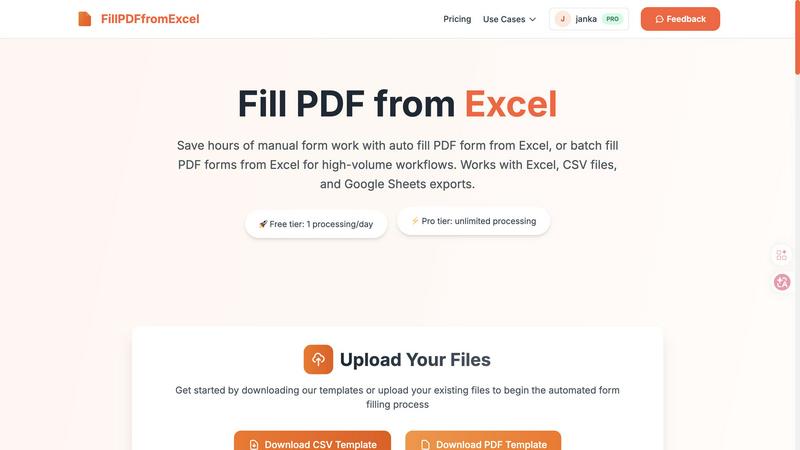
Fill PDF from Excel automates your team's high-volume form workflows, saving hours of manual data entry.
Last updated: March 19, 2026

Gimme-A-Quote
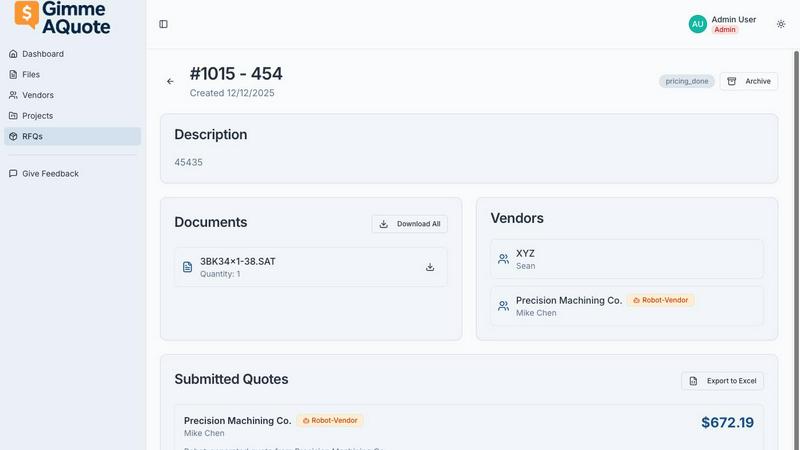
Gimme-A-Quote helps your team and vendors collaborate to send quotes effortlessly.
Last updated: March 1, 2026
Visual Comparison
Fill PDF from Excel
Gimme-A-Quote
Feature Comparison
Fill PDF from Excel
Intelligent Field Mapping
Our platform features smart, automatic field detection that intuitively matches the column headers in your Excel or CSV file to the corresponding fillable fields in your PDF form template. This intelligent mapping drastically reduces setup time, allowing your team to move from upload to results faster. You can easily review and adjust these mappings to ensure perfect alignment, creating a reliable template that your entire department can use repeatedly for consistent, error-free outputs.
High-Volume Batch Processing
Engineered for team efficiency, this feature allows you to process hundreds or even thousands of PDF forms in a single, streamlined operation. Simply upload one PDF template and one data file with multiple rows; the system will generate a unique, filled PDF for each row of data. This batch-fill capability is perfect for collaborative projects like sending out mass client agreements, employee onboarding packets, or student enrollment forms, turning days of work into a task that takes minutes.
Multi-Source Data Compatibility
To support diverse team workflows and tools, Fill PDF from Excel works seamlessly with data from Excel (.xlsx, .xls), CSV files, and exports from Google Sheets. This flexibility means that whether your sales team uses Google Sheets, your admin staff uses Excel, or you receive data as a CSV from another system, everyone can contribute to and benefit from the same automated PDF filling process without time-consuming file conversions.
Template-Based Reusability
Configure your field mappings once and save the setup for future use. This creates a powerful, reusable workflow that any team member can execute. When a new batch of data arrives, simply upload the new spreadsheet to the saved template flow and generate the filled PDFs instantly. This promotes consistency across all documents and empowers every team member to execute complex form filling without specialized training, fostering a truly cooperative and efficient work environment.
Gimme-A-Quote
Stupid Simple Setup
Getting your team and vendors on the same page has never been easier. You can create an account, invite a vendor, and send a Request for Quote (RFQ) in minutes. There's no need for lengthy manuals, training videos, or complex configuration. The intuitive design means everyone, from your most tech-savvy team member to a vendor with a flip-phone, can jump in and collaborate immediately, streamlining your collective workflow from day one.
Built for Human Collaboration
This platform is engineered for people, not IT departments. It uses clear, straightforward language and avoids the confusing jargon that typically makes teams groan. By focusing on a clean, user-friendly interface, Gimme-A-Quote ensures that communication between your shop and your suppliers is smooth and efficient, strengthening those vital partnerships without the typical software friction.
Drama-Free Quote Management
Stop overthinking and just send the quote. The tool strips away unnecessary complexity, providing a direct path from creating a quote to sending it to your customer or vendor. This eliminates the common frustrations of bloated ERP systems, helping your team work in harmony without the desire to throw a laptop across the shop, keeping morale high and projects moving forward.
Predictable, Transparent Costing
Enjoy straightforward, team-friendly pricing with no hidden fees or surprise charges. With one low price that covers your core needs (you only pay extra for additional storage), budgeting is simple and predictable. This cost-effective approach ensures the entire team has access to the tools they need without financial strain, promoting unrestricted collaboration.
Use Cases
Fill PDF from Excel
HR & Employee Onboarding
HR teams can collaboratively streamline the onboarding process by batch-generating employment contracts, tax forms (like W-4s), and benefit enrollment documents for new hires. Using a single master spreadsheet with all new employee data, the entire packet of personalized forms can be created automatically, ensuring accuracy and saving the HR department dozens of manual hours, allowing them to provide a better welcome experience.
Financial & Tax Document Preparation
Accounting and finance departments can use this tool to efficiently populate client tax returns, invoice templates, or financial reporting forms from centralized data. This ensures data integrity, reduces the risk of transposition errors common in manual entry, and allows the team to handle a higher volume of client work during peak seasons like tax time, all while maintaining a strict standard of accuracy.
Educational Administration
School and university administrative teams can automate the creation of student enrollment forms, permission slips, and report cards. By pulling data from student information systems into a spreadsheet, they can generate personalized documents for an entire class or grade level in one go, freeing up administrative staff to focus on direct student and parent support instead of paperwork.
Legal and Real Estate Document Assembly
Law firms and real estate agencies can quickly assemble high volumes of standardized legal documents, such as rental agreements, client engagement letters, or property disclosure forms. By automating the population of client names, addresses, and specific terms from a case or transaction spreadsheet, legal assistants and agents can ensure precision and dramatically accelerate document turnaround times.
Gimme-A-Quote
Streamlining Vendor RFQs
A small manufacturing shop can quickly send detailed Requests for Quotes to multiple material suppliers simultaneously. This coordinated approach ensures all vendors receive the same clear information, enabling them to provide accurate, comparable bids faster, which helps the internal team make purchasing decisions efficiently and as a united front.
Fast Client Quoting for Service Teams
A trades team on a job site can use their mobile device to generate and send a professional quote to a client before even leaving the premises. This rapid turnaround, facilitated by easy team access to pricing templates, impresses customers and accelerates the sales cycle, allowing the crew to focus on their next collaborative project.
Simplifying Internal Cost Estimation
Project managers and estimators can work together within the platform to build out quote templates with standard labor and material rates. This shared resource ensures consistency across all quotes, reduces individual calculation errors, and allows team members to support each other in preparing accurate proposals quickly.
Enhancing Partner and Subcontractor Coordination
For teams that rely on subcontractors, Gimme-A-Quote provides a simple channel to solicit and manage bids. By bringing this communication into one straightforward platform, it eliminates messy email chains and lost documents, ensuring everyone involved is aligned and accountable, which is crucial for successful project synergy.
Overview
About Fill PDF from Excel
Fill PDF from Excel is a collaborative automation platform designed to transform how teams handle document workflows. It seamlessly bridges the gap between your data and your forms, enabling you to auto-fill and batch-fill PDF forms directly from data stored in Excel, CSV files, or Google Sheets. This tool is built for professionals and teams across HR, finance, legal, education, and business services who are burdened by repetitive, high-volume form processing. The core value proposition is synergy: by automating the tedious task of manual data entry, teams can reclaim countless hours, significantly reduce human error, and redirect their collective energy toward more strategic, high-value work. Instead of one person painstakingly copying data, the entire team benefits from a configured, repeatable process that delivers consistent, reliable results. It fosters a cooperative environment where technology handles the repetition, allowing human talent to focus on analysis, client service, and innovation. Whether you're processing 10 forms or 10,000, Fill PDF from Excel provides a unified solution that scales with your team's needs, promoting efficiency and accuracy through smart automation.
About Gimme-A-Quote
Gimme-A-Quote is the collaborative quoting tool built for small shops and teams who value simplicity and speed over complex software suites. It cuts through the noise of traditional enterprise systems, offering a laser-focused platform where the primary goal is to send quotes quickly and without frustration. This tool is designed for hands-on teams—from machine shops to trade businesses—who may not be tech experts and are tired of cumbersome processes that slow them down. By eliminating lengthy onboarding, confusing modules, and consultant dependencies, Gimme-A-Quote fosters seamless cooperation between your internal team and your vendors. The core value proposition is powerful yet simple: save time, reduce stress, and enhance team synergy by removing the administrative drama from quoting. This allows your collective energy to be redirected towards what truly matters—delivering exceptional service and products to your customers, together.
Frequently Asked Questions
Fill PDF from Excel FAQ
What file formats are supported for the PDF and data files?
We support fillable PDF forms as templates. For your data source, we accept Excel files (.xlsx and .xls), CSV files, and exports from Google Sheets. It is crucial that your PDF has properly defined, fillable form fields for our intelligent mapping system to detect and populate them correctly from your spreadsheet columns.
Do you store the files we upload for processing?
As a core feature focused on your security and privacy, we do not permanently store your uploaded PDF or data files. Uploaded files are processed in memory to generate your filled PDF results and are not retained on our servers after the processing session is complete, giving your team peace of mind when handling sensitive information.
How does the field mapping work?
When you upload your PDF form and data file, our system automatically scans the PDF for fillable fields and attempts to match them with column headers from your spreadsheet. You will be presented with a mapping screen to review these connections. Here, your team can manually link any unmatched fields or correct any suggestions, ensuring the automation aligns perfectly with your specific document structure.
Can I generate multiple PDFs from one data file?
Absolutely. This is the core of our batch processing capability. Each row in your Excel or CSV data file represents one unique set of information. When you run the process, the system will create a separate, individually filled PDF document for every row in your spreadsheet, making it ideal for teams that need to produce large volumes of personalized forms efficiently.
Gimme-A-Quote FAQ
Is Gimme-A-Quote really suitable for non-tech-savvy users?
Absolutely. The platform was specifically designed for individuals and teams who are experts in their trade, not in software. The interface is intentionally minimal and intuitive, using plain language. If you can send an email, you can use Gimme-A-Quote. We've built it so that everyone on your team and even your least tech-oriented vendors can collaborate without a learning curve.
How does this tool help our team work better together?
Gimme-A-Quote centralizes your quoting process, eliminating confusion and version control issues. When everyone uses the same simple system, from creating an RFQ to sending a final quote, information flows smoothly. This transparency reduces back-and-forth communication, prevents errors, and allows team members to easily support each other, creating a more synergistic and efficient workflow.
Can we invite our vendors to use the platform for free?
Yes, you can invite an unlimited number of vendors to receive and respond to your RFQs at no cost to them. This is key to our collaborative design. Removing barriers for your suppliers means they are more likely to engage quickly and efficiently, benefiting the entire partnership and helping your team get the quotes you need faster.
What if we need more features in the future?
Gimme-A-Quote is purpose-built to do one thing exceptionally well: streamline quoting. We believe in focused tools that enhance team productivity without bloat. If your business grows to require a full-scale ERP system, this tool will have already saved you countless hours and stress. For now, it empowers your team to collaborate effectively on the task at hand.
Alternatives
Fill PDF from Excel Alternatives
Fill PDF from Excel is a productivity and management tool designed to streamline document workflows. It automates the process of populating PDF forms with data from spreadsheets, saving teams significant time and reducing manual entry errors. This collaborative approach allows groups to handle high-volume tasks with greater synergy and efficiency. Users often explore alternatives for various reasons, such as budget constraints, specific feature requirements, or compatibility with different operating systems and platforms. A team's unique workflow, the scale of their operations, and their need for integration with other software can all drive the search for a different solution. When evaluating other options, it's crucial to consider the tool's ease of use, the security of your data, and how well it supports team collaboration. Look for solutions that offer reliable mapping capabilities, batch processing for efficiency, and seamless integration with your existing data sources to maintain a smooth and cooperative workflow.
Gimme-A-Quote Alternatives
Gimme-A-Quote is a productivity and management tool designed to simplify the quoting process for small shops and teams. It allows teams to send quotes quickly by uploading files, bypassing the need for complex software or extensive training. This focus on effortless collaboration makes it a strong choice for teams seeking to streamline their workflow together. Teams often explore alternatives for various reasons, such as needing different pricing structures, more advanced features for scaling, or integration with other platforms their team already uses. It’s a natural part of finding the perfect collaborative fit for your group’s unique rhythm and long-term goals. When your team evaluates other options, consider the balance between simplicity and power. Look for tools that enhance your team's synergy without creating new hurdles. The ideal solution should support your collective workflow, foster clear communication with vendors, and grow with your shared ambitions.