Code Word Solver - Missing Words Finder vs FindExams
Side-by-side comparison to help you choose the right product.

Code Word Solver - Missing Words Finder
Unlock your codeword puzzles effortlessly with our intuitive solver that finds missing words in seconds.
Last updated: February 28, 2026

FindExams
FindExams offers realistic exam simulations and detailed analytics to help you confidently prepare for PMP, PMI-ACP, ITIL 4, and more.
Last updated: March 18, 2026
Visual Comparison
Code Word Solver - Missing Words Finder

FindExams
Feature Comparison
Code Word Solver - Missing Words Finder
Single Pattern Solving
The single pattern solving feature allows users to enter a single known word pattern and receive a list of matching word candidates. This feature is particularly useful when you have partial information about a word and are seeking to fill in the blanks. By simply inputting the letters you know, along with placeholders for unknown letters, you can quickly find words that fit the criteria, streamlining the solving process.
Multi-Pattern Solving
For those tackling more complex puzzles, the multi-pattern solving option lets you enter two patterns simultaneously. This is especially beneficial when working with linked words that share common number-to-letter relationships. By utilizing this feature, solvers can efficiently work through interrelated puzzles, making it easier to decode the entire grid without losing track of potential connections between words.
Flexible Input for Unknown Letters
Code Word Solver offers a flexible input mechanism that allows users to denote unknown letters with symbols. By using periods (.) or question marks (?) for unique unknown letters and numbers for repeated letters, the solver can maintain consistency in letter relationships. This flexibility helps in narrowing down potential answers, making the search for words more precise and efficient.
Customizable Difficulty Levels
Understanding that different players have different preferences, Code Word Solver provides options for selecting the dictionary size based on difficulty. Users can choose from hard (260k words), normal (115k words), or easy (20k words) dictionaries. This feature ensures that players can tailor their experience according to their skill level, enhancing both enjoyment and challenge in solving codeword puzzles.
FindExams
Realistic Practice Exams
FindExams offers a collection of realistic practice exams that simulate the actual testing conditions. These exams include timed sessions, randomized questions, and a balanced distribution of topics to ensure users experience an authentic exam scenario.
Domain-Level Analytics
The platform provides detailed performance analytics that break down users' scores by domain. This feature allows candidates to see where they excel and where they need more focus, enabling a targeted approach to their study regimen and maximizing their readiness.
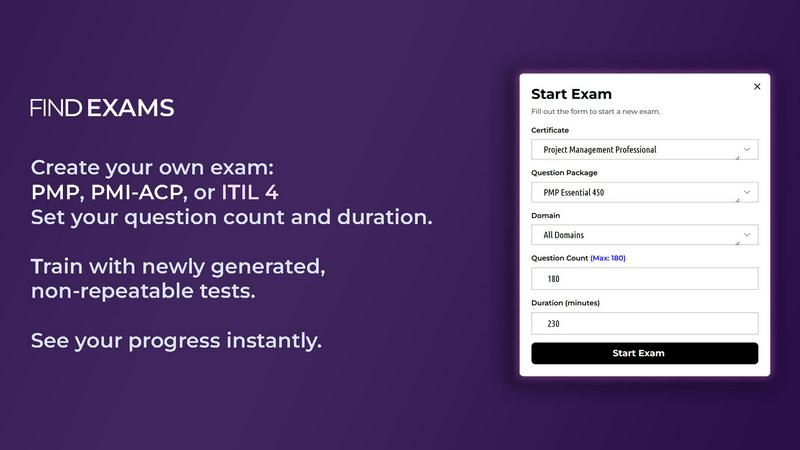
Customizable Exam Settings
Users can customize their exam experience by selecting the question count, setting timers, and filtering questions by specific domains or topics. This flexibility allows for a tailored practice session that aligns with individual study goals and preferences.
Free Demo Exams
FindExams allows potential users to take free demo exams before committing to a full package. This feature enables candidates to experience the platform’s capabilities and understand how it can support their exam preparation journey.
Use Cases
Code Word Solver - Missing Words Finder
Enhance Problem-Solving Skills
Students and puzzle enthusiasts can use Code Word Solver as a training tool to enhance their problem-solving abilities. By analyzing word patterns and relationships, users can improve their vocabulary and develop critical thinking skills, which are beneficial in various academic and personal pursuits.
Competitive Puzzle Solving
For competitive players participating in codeword tournaments or challenges, this tool serves as a vital resource. It allows them to quickly and accurately find word solutions, giving them an edge over other participants. The ability to solve puzzles efficiently can significantly impact their performance and overall success in competitions.
Casual Fun with Friends
Friends and family can enjoy a fun-filled game night using Code Word Solver to tackle codeword puzzles together. By collaboratively inputting known patterns and discussing possible words, players can enhance their social interactions while engaging in a stimulating activity that sharpens their minds.
Community Contribution
Users who discover words not included in the database can contribute to the tool’s growth by submitting new words or definitions. This collaborative approach fosters a sense of community among users, as they work together to improve the word coverage of the solver. It encourages engagement and ensures that the database evolves with the contributions of its user base.
FindExams
Preparing for PMP Certification
Professionals aiming for PMP certification can utilize FindExams to practice with a vast question bank specifically designed to align with the PMBOK and ECO. This focused preparation helps them gain confidence and improve their chances of passing the exam on their first attempt.
Mastering Agile Concepts for PMI-ACP
Individuals pursuing the PMI-ACP certification can benefit from scenario-based mock exams that focus on agile principles and tools. The platform’s randomized tests simulate real-world pressures, allowing candidates to build confidence in their agile knowledge.
Business Analysis Preparation for PMI-PBA
FindExams serves as an essential tool for candidates preparing for the PMI-PBA certification. The exam simulator provides domain-balanced questions and real-world scenarios, ensuring that users understand business analysis frameworks and are well-equipped for their exams.
Exam Readiness Tracking
All users, regardless of certification, can leverage FindExams’ performance tracking features to review their progress over time. By analyzing accuracy and speed, candidates can adjust their study strategies and improve their exam readiness effectively.
Overview
About Code Word Solver - Missing Words Finder
Code Word Solver - Missing Words Finder is an innovative tool designed to assist puzzle enthusiasts in cracking codeword puzzles more efficiently and accurately. Codeword puzzles, which replace letters with numbers (from 1 to 26), often leave players guessing when they encounter unknown letters. This tool eliminates guesswork by allowing users to input known letter patterns and instantly narrowing down possible answers. Whether you are a beginner or a seasoned codeword player, this tool caters to all skill levels. With its easy-to-use interface and powerful filtering capabilities, you can decode puzzles with confidence and enhance your problem-solving skills. The product is perfect for anyone who enjoys word games, from casual players looking for some fun to competitive solvers aiming to improve their speed and accuracy. The main value proposition lies in its ability to simplify the solving process while providing a community-driven approach to expanding its word database.
About FindExams
FindExams is a comprehensive online certification exam simulator tailored to help professionals prepare effectively for a variety of high-stakes certification exams, including PMP, PMI-ACP, ITIL 4 Foundation, PMI-PBA, and IIBA-AAC. This platform is specifically designed for individuals seeking to enhance their knowledge and boost their confidence through realistic practice sessions that closely mirror the actual exam environment. FindExams stands out by providing a practical learning experience that focuses on understanding concepts rather than rote memorization. Users can engage with domain-balanced questions, receive detailed explanations for each answer, and track their performance analytics, allowing them to identify and improve upon their weakest areas. This combination of features ensures that users are not only prepared but feel empowered to succeed when they sit for their official certification exams.
Frequently Asked Questions
Code Word Solver - Missing Words Finder FAQ
How do I enter my known letters into the solver?
To enter known letters, simply input the letters you have, using periods (.) or question marks (?) for unknown letters. For repeated unknown letters, use numbers to represent each letter consistently.
Can I solve multiple words at once?
Yes, the Code Word Solver allows for multi-pattern solving, enabling you to enter two patterns simultaneously. This is particularly useful for solving linked words that share common number-to-letter relationships.
What dictionary sizes are available?
Users can choose from three different dictionary sizes: hard (260k words), normal (115k words), and easy (20k words). This allows you to tailor your experience based on your skill level and the type of puzzle you are solving.
How can I contribute to the word database?
If you find a word that is not in the database or want to add a definition, you can submit it directly through the tool. This community-driven feature helps improve the word coverage over time and enhances the overall functionality of the solver.
FindExams FAQ
What certifications can I prepare for using FindExams?
FindExams supports preparation for several professional certifications, including PMP, PMI-ACP, ITIL 4 Foundation, PMI-PBA, and IIBA-AAC, offering tailored practice exams for each.
How does FindExams ensure a realistic exam experience?
The platform simulates real exam conditions by providing timed sessions, randomized questions, and a focus on domain-balanced topics, allowing users to experience the pressure and format of actual certification exams.
Can I customize my practice exams on FindExams?
Yes, users can customize their practice exams by selecting the number of questions, setting time limits, and filtering by specific domains or topics, allowing for a personalized preparation experience.
Is there a free trial available for FindExams?
Absolutely! FindExams offers free demo exams that allow potential users to test the system and its features before committing to a full preparation package. This helps ensure it meets their needs.
Alternatives
Code Word Solver - Missing Words Finder Alternatives
Code Word Solver - Missing Words Finder is a specialized online tool designed to assist users in solving codeword puzzles efficiently. It belongs to the category of puzzle-solving applications, focusing on decoding word patterns by leveraging known letter-number relationships. Users frequently seek alternatives for various reasons, including pricing structures, feature sets, and compatibility with their specific puzzle-solving needs. When searching for an alternative, it's essential to consider aspects such as user interface, the size of the word database, customization options, and overall performance to find a solution that best meets individual requirements.
FindExams Alternatives
FindExams is an online certification exam simulator tailored for professionals preparing for various certifications like PMP, PMI-ACP, and ITIL 4. This platform falls under the Education & Learning category, offering realistic practice exams that closely mirror the structure and timing of actual certification tests. Users often seek alternatives to FindExams for various reasons, including pricing, specific feature requirements, and compatibility with their learning styles. When choosing an alternative, it's essential to consider the quality of practice questions, the ability to track progress, the depth of performance analytics, and how well the platform supports your specific certification goals.