Fieldtics vs Fill PDF from Excel
Side-by-side comparison to help you choose the right product.

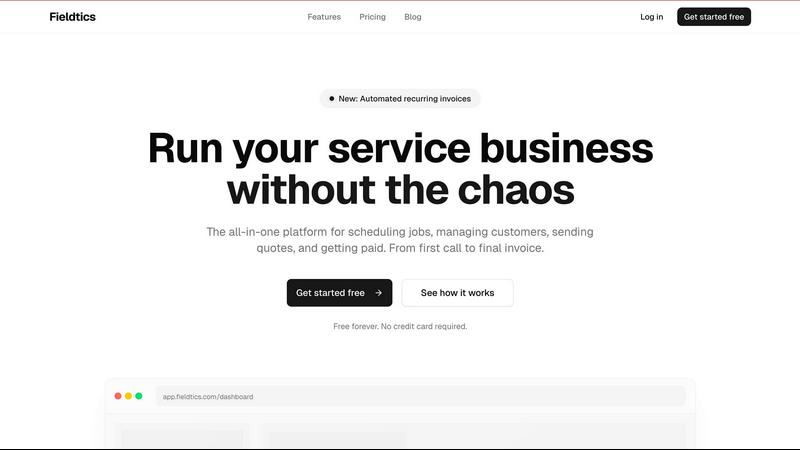
Fieldtics streamlines job scheduling, customer management, and invoicing for service businesses, keeping teams.
Last updated: February 28, 2026

Fill PDF from Excel
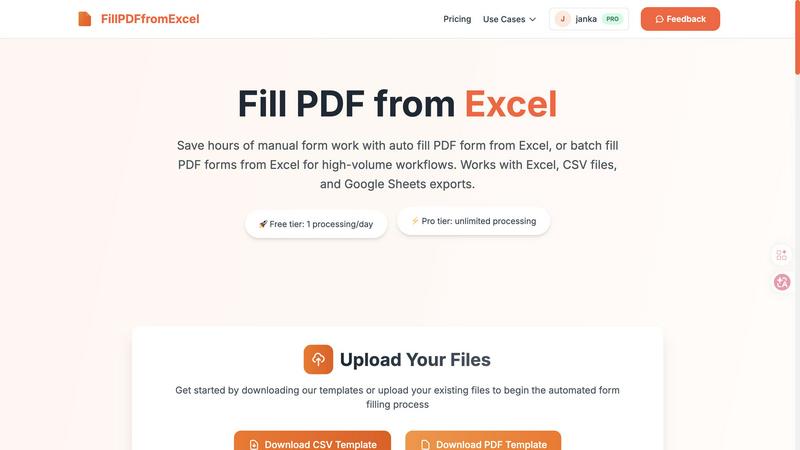
Fill PDF from Excel automates your team's high-volume form workflows, saving hours of manual data entry.
Last updated: March 19, 2026
Visual Comparison
Fieldtics
Fill PDF from Excel
Feature Comparison
Fieldtics
Smart Job Scheduling
Fieldtics features an intelligent job scheduling system that allows you to assign tasks based on availability and expertise. This ensures that your team can maximize productivity and minimize downtime, keeping every job on track and moving forward.
Customer Relationship Management (CRM)
With an integrated CRM, Fieldtics enables you to manage customer interactions seamlessly. Track leads, follow up on inquiries, and maintain a robust database of customer information, ensuring that your relationships are nurtured and fostered for long-term success.
Automated Invoicing and Payments
Fieldtics simplifies the invoicing process by allowing you to create, send, and manage invoices effortlessly. The platform also supports automated recurring invoices, ensuring timely payments and improving cash flow while reducing administrative burdens.
Customizable Dashboards and Branding
Tailor your Fieldtics experience with customizable dashboards and branding options. This feature allows you to modify layouts, menus, and overall aesthetics to reflect your business identity, making it feel like a natural extension of your operations.
Fill PDF from Excel
Intelligent Field Mapping
Our platform features smart, automatic field detection that intuitively matches the column headers in your Excel or CSV file to the corresponding fillable fields in your PDF form template. This intelligent mapping drastically reduces setup time, allowing your team to move from upload to results faster. You can easily review and adjust these mappings to ensure perfect alignment, creating a reliable template that your entire department can use repeatedly for consistent, error-free outputs.
High-Volume Batch Processing
Engineered for team efficiency, this feature allows you to process hundreds or even thousands of PDF forms in a single, streamlined operation. Simply upload one PDF template and one data file with multiple rows; the system will generate a unique, filled PDF for each row of data. This batch-fill capability is perfect for collaborative projects like sending out mass client agreements, employee onboarding packets, or student enrollment forms, turning days of work into a task that takes minutes.
Multi-Source Data Compatibility
To support diverse team workflows and tools, Fill PDF from Excel works seamlessly with data from Excel (.xlsx, .xls), CSV files, and exports from Google Sheets. This flexibility means that whether your sales team uses Google Sheets, your admin staff uses Excel, or you receive data as a CSV from another system, everyone can contribute to and benefit from the same automated PDF filling process without time-consuming file conversions.
Template-Based Reusability
Configure your field mappings once and save the setup for future use. This creates a powerful, reusable workflow that any team member can execute. When a new batch of data arrives, simply upload the new spreadsheet to the saved template flow and generate the filled PDFs instantly. This promotes consistency across all documents and empowers every team member to execute complex form filling without specialized training, fostering a truly cooperative and efficient work environment.
Use Cases
Fieldtics
Service Scheduling for Home Maintenance
Fieldtics is perfect for home maintenance businesses that need to schedule jobs efficiently. With its smart scheduling feature, you can assign technicians based on their skills and availability, ensuring that every job is handled promptly.
Managing Customer Relationships in Landscaping
Landscaping companies can leverage Fieldtics' CRM capabilities to manage customer interactions effectively. By tracking leads and maintaining detailed customer records, businesses can enhance their marketing strategies and improve service delivery.
Streamlining Invoicing for Electricians
Electricians can benefit from Fieldtics' automated invoicing system, which allows them to create and send invoices quickly after completing a job. This feature ensures that payments are received on time and reduces the administrative workload.
Tracking Expenses and Project Management for Cleaning Services
Cleaning service providers can use Fieldtics to track expenses and manage projects efficiently. By monitoring time and resources spent on each job, businesses can optimize operations and increase profitability.
Fill PDF from Excel
HR & Employee Onboarding
HR teams can collaboratively streamline the onboarding process by batch-generating employment contracts, tax forms (like W-4s), and benefit enrollment documents for new hires. Using a single master spreadsheet with all new employee data, the entire packet of personalized forms can be created automatically, ensuring accuracy and saving the HR department dozens of manual hours, allowing them to provide a better welcome experience.
Financial & Tax Document Preparation
Accounting and finance departments can use this tool to efficiently populate client tax returns, invoice templates, or financial reporting forms from centralized data. This ensures data integrity, reduces the risk of transposition errors common in manual entry, and allows the team to handle a higher volume of client work during peak seasons like tax time, all while maintaining a strict standard of accuracy.
Educational Administration
School and university administrative teams can automate the creation of student enrollment forms, permission slips, and report cards. By pulling data from student information systems into a spreadsheet, they can generate personalized documents for an entire class or grade level in one go, freeing up administrative staff to focus on direct student and parent support instead of paperwork.
Legal and Real Estate Document Assembly
Law firms and real estate agencies can quickly assemble high volumes of standardized legal documents, such as rental agreements, client engagement letters, or property disclosure forms. By automating the population of client names, addresses, and specific terms from a case or transaction spreadsheet, legal assistants and agents can ensure precision and dramatically accelerate document turnaround times.
Overview
About Fieldtics
Fieldtics is a comprehensive platform tailored specifically for service businesses looking to enhance their operational efficiency. Designed to eliminate the chaos of daily tasks, Fieldtics integrates essential tools into a single, user-friendly interface. Whether you are managing job scheduling, customer relationships, invoicing, or payment processing, Fieldtics provides a streamlined solution that covers every critical aspect of your workflow. The platform is built for teams that need to stay connected, whether they are in the office or working on-site. With both web and mobile applications, Fieldtics ensures that your team has real-time access to updates and information, fostering collaboration and synergy. Additionally, you can customize your dashboard and branding, allowing the platform to seamlessly align with your business identity. The ability to integrate with existing tools automates workflows and centralizes data, empowering you to manage leads, customers, projects, time tracking, expenses, and recurring invoices. This clarity and control are vital for businesses aiming to grow and thrive in today's competitive environment.
About Fill PDF from Excel
Fill PDF from Excel is a collaborative automation platform designed to transform how teams handle document workflows. It seamlessly bridges the gap between your data and your forms, enabling you to auto-fill and batch-fill PDF forms directly from data stored in Excel, CSV files, or Google Sheets. This tool is built for professionals and teams across HR, finance, legal, education, and business services who are burdened by repetitive, high-volume form processing. The core value proposition is synergy: by automating the tedious task of manual data entry, teams can reclaim countless hours, significantly reduce human error, and redirect their collective energy toward more strategic, high-value work. Instead of one person painstakingly copying data, the entire team benefits from a configured, repeatable process that delivers consistent, reliable results. It fosters a cooperative environment where technology handles the repetition, allowing human talent to focus on analysis, client service, and innovation. Whether you're processing 10 forms or 10,000, Fill PDF from Excel provides a unified solution that scales with your team's needs, promoting efficiency and accuracy through smart automation.
Frequently Asked Questions
Fieldtics FAQ
What types of businesses can benefit from Fieldtics?
Fieldtics is designed for service businesses across various industries, including home maintenance, landscaping, cleaning services, and more. Its features cater to the unique needs of companies that require efficient job scheduling and customer management.
Is Fieldtics easy to use for non-technical users?
Absolutely! Fieldtics is developed with user-friendliness in mind, making it accessible for individuals with varying levels of technical expertise. The intuitive interface allows users to navigate and utilize features without extensive training.
Can I integrate Fieldtics with other tools my business uses?
Yes, Fieldtics offers seamless integration with many popular applications and tools. This capability allows you to sync data, automate workflows, and maintain a centralized workspace, enhancing your overall operational efficiency.
Is there a free trial available for Fieldtics?
Fieldtics offers a free plan, allowing you to get started without any upfront costs. This plan includes essential features such as unlimited clients, job scheduling, and access to the mobile app, enabling you to experience the platform's benefits firsthand.
Fill PDF from Excel FAQ
What file formats are supported for the PDF and data files?
We support fillable PDF forms as templates. For your data source, we accept Excel files (.xlsx and .xls), CSV files, and exports from Google Sheets. It is crucial that your PDF has properly defined, fillable form fields for our intelligent mapping system to detect and populate them correctly from your spreadsheet columns.
Do you store the files we upload for processing?
As a core feature focused on your security and privacy, we do not permanently store your uploaded PDF or data files. Uploaded files are processed in memory to generate your filled PDF results and are not retained on our servers after the processing session is complete, giving your team peace of mind when handling sensitive information.
How does the field mapping work?
When you upload your PDF form and data file, our system automatically scans the PDF for fillable fields and attempts to match them with column headers from your spreadsheet. You will be presented with a mapping screen to review these connections. Here, your team can manually link any unmatched fields or correct any suggestions, ensuring the automation aligns perfectly with your specific document structure.
Can I generate multiple PDFs from one data file?
Absolutely. This is the core of our batch processing capability. Each row in your Excel or CSV data file represents one unique set of information. When you run the process, the system will create a separate, individually filled PDF document for every row in your spreadsheet, making it ideal for teams that need to produce large volumes of personalized forms efficiently.
Alternatives
Fieldtics Alternatives
Fieldtics is an all-in-one platform designed for service businesses, streamlining essential operations such as scheduling, customer management, invoicing, and payment processing. As a comprehensive solution, it helps organizations cut through daily operational chaos, fostering efficiency and connectivity among team members, whether they are in the office or out in the field. Users commonly seek alternatives to Fieldtics for a variety of reasons, including pricing considerations, specific features that may better suit their needs, or compatibility with existing systems. When exploring alternatives, it's crucial to assess the features that align with your business requirements, the flexibility of the platform, and the quality of customer support, ensuring that you choose a solution that enhances your team's collaboration and operational synergy.
Fill PDF from Excel Alternatives
Fill PDF from Excel is a productivity and management tool designed to streamline document workflows. It automates the process of populating PDF forms with data from spreadsheets, saving teams significant time and reducing manual entry errors. This collaborative approach allows groups to handle high-volume tasks with greater synergy and efficiency. Users often explore alternatives for various reasons, such as budget constraints, specific feature requirements, or compatibility with different operating systems and platforms. A team's unique workflow, the scale of their operations, and their need for integration with other software can all drive the search for a different solution. When evaluating other options, it's crucial to consider the tool's ease of use, the security of your data, and how well it supports team collaboration. Look for solutions that offer reliable mapping capabilities, batch processing for efficiency, and seamless integration with your existing data sources to maintain a smooth and cooperative workflow.