DigitalMagicWand vs URL to Any
Side-by-side comparison to help you choose the right product.

DigitalMagicWand
DigitalMagicWand is your collaborative AI suite for creating and refining visuals, audio, video, and text together.
Last updated: March 18, 2026

URL to Any
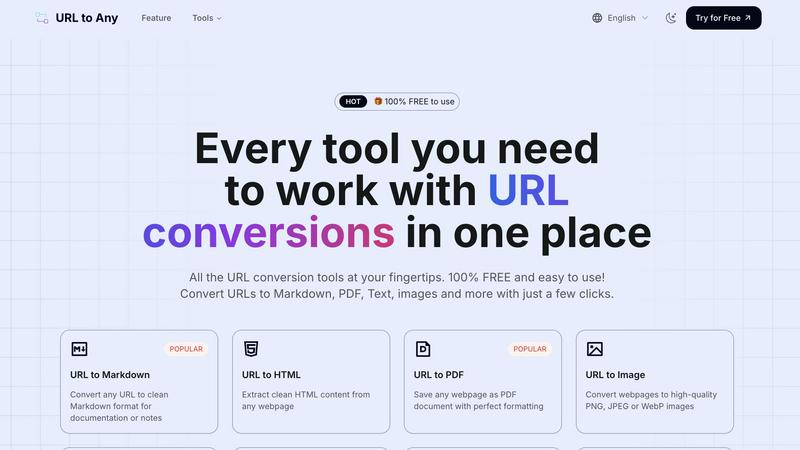
URL to Any converts web content into any format your team needs for seamless collaboration.
Last updated: March 2, 2026
Visual Comparison
DigitalMagicWand

URL to Any
Feature Comparison
DigitalMagicWand
Unified AI Content Suite
DigitalMagicWand brings together a powerful collection of specialized AI tools under one roof, fostering a collaborative workflow. Instead of juggling disparate software for text, image, and audio, teams can work synergistically within a single platform. This integration allows for seamless transitions between tasks, such as generating text for a video script, creating accompanying visuals, and then editing the audio track, all while maintaining a consistent and efficient team-oriented process.
Advanced AI Text Analysis & Humanization
This feature set provides a powerful one-two punch for written content. The Accurate AI Detector offers clear, confidence-based analysis to identify machine-generated text, enabling teams to ensure content authenticity collaboratively. Its counterpart, the Undetectable AI Text Humanizer, then allows for the refinement of AI-assisted drafts into natural, human-sounding writing. This synergy helps writing teams maintain a genuine voice and meet editorial standards with confidence.
Professional-Grade Audio Processing Tools
From the legendary precision of Digital Ear™ for converting piano audio to editable MIDI, to the studio-quality stem separation of UnMixIt™ Pro, this suite empowers musicians and audio professionals. These tools are built for collaboration, allowing producers, DJs, and musicians to isolate vocals, drums, or bass tracks for remixing, sampling, or creating karaoke versions, thus streamlining group projects and creative experimentation.
Intuitive AI-Powered Image Generation & Editing
This feature set turns descriptive text into stunning visual assets and enables effortless photo manipulation. Teams can generate custom vector art or photorealistic images from simple prompts, and then collaboratively edit them using the AI Image Editor. The ability to remove backgrounds, swap elements, or restore photos through simple text commands democratizes high-end visual creation, allowing all team members to contribute to the design process.
URL to Any
Comprehensive Format Conversion
URL to Any offers a powerful suite of conversion tools that transform a single webpage into multiple useful formats with just a few clicks. This includes popular options like converting to clean Markdown for documentation, saving as a perfectly formatted PDF for archiving, extracting pure text content, generating high-quality images (PNG, JPEG, WebP), and even creating structured data outputs like JSON and XML. This diversity ensures every team member can access web content in the format that best suits their role and task, promoting seamless information sharing.
Advanced Extraction & Utility Tools
Beyond basic conversion, the platform includes advanced utilities that enhance team productivity and data handling. Features like the AI Summarizer condense lengthy articles into key points for quick team briefings. The URL Meta Tags and Heading Extractor allows marketing and SEO teams to collaboratively analyze webpage SEO elements. Tools for URL encoding/decoding across 8+ formats, extracting all links from a site, and opening multiple URLs simultaneously streamline development and research workflows, turning individual webpages into rich data sources.
Secure, Cloud-Based Processing
All conversion and processing happens instantly in the cloud, requiring no software installation or complex setup. This cloud-native approach guarantees global access from any device, enabling distributed teams to collaborate effortlessly. Importantly, the service is designed with privacy in mind; your data is processed securely and never stored on the servers, ensuring that sensitive information shared from URLs remains confidential and protected throughout the team's workflow.
Intuitive & Frictionless User Experience
The platform is built on a foundation of profound simplicity, featuring an easy-to-use interface that makes sophisticated conversions effortless. The process is consistently straightforward: paste a URL, choose your desired format, and get your result in seconds. With options to download the converted file or copy content directly to the clipboard, integrating results into team documents, presentations, or codebases is incredibly smooth, removing technical barriers and fostering wider team adoption.
Use Cases
DigitalMagicWand
Content Creation & Marketing Teams
Marketing agencies and in-house content teams can leverage the platform's synergy to produce cohesive campaigns. Writers can generate and humanize blog copy, designers can instantly create matching social media graphics and vectors from text descriptions, and editors can produce promotional videos using cleaned audio stems and AI-edited visuals, all within a collaborative ecosystem that accelerates project timelines.
Academic & Research Integrity
Educational institutions and research departments can work together to uphold academic standards. The AI Text Detector allows educators and peer reviewers to collaboratively verify the originality of student submissions or research papers. Furthermore, the tool can be used as a learning aid to help students understand the difference between AI-generated and authentic human writing, fostering a cooperative educational environment.
Music Production & Audio Engineering
Music production teams, from solo artists to full bands, can use the audio tools for collaborative creation and post-production. A pianist can convert a live recording to MIDI for easy sharing and arrangement with bandmates. Producers and DJs can isolate acapellas or instrumental tracks for remixes and mashups, facilitating a synergistic creative process where individual parts can be freely manipulated and shared.
E-commerce & Product Photography
E-commerce teams and product photographers can streamline their visual asset production. The background removal tool allows for quick, consistent creation of product cutouts on white backgrounds. Meanwhile, the AI Image Editor enables teams to collaboratively place products into different scenes or onto models without organizing costly photoshoots, allowing for rapid iteration and A/B testing of marketing imagery.
URL to Any
Collaborative Research & Documentation
Research teams can synergize their efforts by converting key articles and sources into clean Markdown or text files. This standardized output can be instantly compiled into shared team wikis, project documentation, or literature reviews, ensuring everyone works from a consistent, distraction-free base of information and accelerates the collaborative synthesis of insights.
Streamlined Content Creation & Marketing
Content and marketing teams can repurpose web-based research, competitor analyses, or inspiration into various assets. Converting a webpage to text aids in drafting blog posts, while generating an image snapshot is perfect for social media previews or presentations. Extracting meta tags collaboratively helps in SEO strategy sessions, making content planning a more integrated team activity.
Development & Data Integration Workflows
Development teams can use URL to Any to extract clean HTML, JSON, or XML from webpages to fuel applications or populate databases during prototyping. The URL encoding/decoding tools assist in debugging, while extracting all URLs from a site can aid in site mapping or audit tasks, facilitating better cooperation between developers, QA, and DevOps.
Archiving & Shared Reference
Project managers and legal or compliance teams can ensure critical web information is preserved for collective reference. Converting important announcements, terms of service, or project briefings into formatted PDFs creates a permanent, shareable record that can be distributed and archived by the entire team, ensuring alignment and a single source of truth.
Overview
About DigitalMagicWand
DigitalMagicWand is a comprehensive and collaborative online platform designed to empower creators, professionals, and teams by simplifying complex digital workflows. It offers a unified suite of AI-powered tools for processing image, audio, video, and text content. The platform's core value proposition lies in transforming individual creative tasks into seamless, synergistic processes, enabling users to enhance, transform, and generate professional-grade content without requiring deep technical expertise. Whether you are a marketer needing compelling visuals, a musician extracting stems, a writer ensuring authenticity, or a content team managing multiple media types, DigitalMagicWand provides a cooperative ecosystem where different tools work in harmony to bring your ideas to life. By leveraging cutting-edge artificial intelligence, it acts as a force multiplier for creativity and productivity, ensuring that every team member can contribute their best work efficiently and effectively.
About URL to Any
In today's interconnected digital workspace, seamless collaboration is paramount. Teams constantly grapple with the challenge of sharing, repurposing, and archiving web content efficiently. URL to Any is the synergistic solution designed to bridge this gap, fostering a more cooperative and integrated team environment. It is a comprehensive, web-based toolkit that empowers individuals and teams to instantly transform any webpage link into a wide array of practical formats. The core value proposition is profound simplicity and accessibility: a completely free service requiring no registration, putting powerful conversion capabilities directly at your team's fingertips. Whether you are a content creator drafting a post from online research, a developer needing clean text or structured data for an application, or a project team archiving critical web data for shared reference, URL to Any facilitates a smoother, unified workflow. It eliminates the friction of manual copying, inconsistent formatting, and juggling multiple disparate tools, allowing teams to focus on cooperation and achieving their shared objectives faster. By providing a one-stop portal for conversions to Markdown, PDF, Text, Images, JSON, and more, URL to Any is the collaborative engine for handling online information.
Frequently Asked Questions
DigitalMagicWand FAQ
What types of files can I process with DigitalMagicWand?
DigitalMagicWand supports a wide range of file formats to facilitate team collaboration. For images, you can upload common formats like JPG, PNG, and output SVG vectors. Audio tools support MP3, WAV, and other standard audio files, with MIDI output for the Digital Ear™ tool. The text tools work with direct input or document uploads. This versatility ensures team members can work with the files they already have.
How accurate is the AI Text Detector?
The Accurate AI Detector is built to provide clear, confidence-based scores to help teams make informed decisions collaboratively. It analyzes text for statistical patterns indicative of AI models like ChatGPT and Gemini. While highly effective, no detector is 100% infallible. We recommend using its results as a collaborative tool for review and discussion within your team, rather than as a sole, definitive verdict.
Can I use the generated images or audio stems commercially?
Yes, the assets you create using DigitalMagicWand's AI tools are intended for your personal and commercial use, allowing your team to integrate them into projects, campaigns, and products. This empowers collaborative commercial ventures. However, it is always the responsibility of the user and their team to ensure that the final use complies with all applicable laws and does not infringe on any third-party rights, such as trademarks or copyrights on original input content.
Do I need technical skills or software to use these tools?
A core philosophy of DigitalMagicWand is democratizing advanced tools for team-wide use. No specialized technical skills or installed software is required. The platform is web-based and designed with an intuitive interface. Features are often driven by simple text prompts or one-click actions, making it easy for every member of a collaborative team—from writers to marketers to musicians—to contribute effectively.
URL to Any FAQ
Is URL to Any really free to use?
Yes, URL to Any is 100% free to use. Every tool in the suite, from URL to Markdown and PDF to the AI Summarizer and advanced extractors, is completely free. There is no registration required, no hidden fees, and no usage limits, making it an accessible tool for teams of all sizes to collaborate without budget constraints.
How does URL to Any ensure the privacy of my data?
Privacy and security are central to our service. When you convert a URL, the content is processed securely through our cloud engine. We do not store the webpage content, your input URL, or the converted output on our servers after the processing is complete. This means your data remains private and is not retained, shared, or used for any other purpose.
What formats can I convert a URL into?
URL to Any supports a wide range of output formats to suit various team needs. Key formats include Markdown, PDF, Text, and Images (PNG, JPEG, WebP). For more technical workflows, you can convert to structured data formats like JSON and XML. Additional utilities allow for QR Code generation, MP3 audio conversion, and various encoding/decoding formats.
Do I need to install any software or browser extension?
No installation is required to use the core web-based tools. You can access all conversion features directly from your browser. However, for even faster and more integrated access, an optional browser extension is available. This allows teams to convert the current webpage they are viewing without copying and pasting, further streamlining collaborative browsing and research.
Alternatives
DigitalMagicWand Alternatives
DigitalMagicWand is a comprehensive AI assistant platform designed for creative and professional teams. It provides a unified suite of tools for processing images, audio, video, and text, all powered by artificial intelligence. This all-in-one approach helps teams streamline their content creation workflows in a single collaborative environment. Teams often explore other options to find the perfect fit for their unique project needs and budget. Common reasons include seeking more specialized tools for a single media type, different pricing or subscription models, or a platform that integrates more seamlessly with their existing team software stack. The goal is to enhance team synergy without disrupting established workflows. When evaluating different platforms, it's wise for a team to consider the scope of AI tools offered, the ease of collaboration among members, and the overall value for their specific use cases. The ideal solution should empower every team member, from designers to marketers, to work together more efficiently and unlock new creative possibilities through AI.
URL to Any Alternatives
URL to Any is a web-based AI assistant designed for collaborative teams, enabling the instant conversion of webpage content into various formats like Markdown, PDF, and text. It streamlines workflows by eliminating manual copying and formatting, fostering a more synergistic approach to handling online information. Users often explore alternatives for several reasons. Some teams may require advanced features like batch processing or API access, while others might need integrations with specific project management platforms. Budget considerations, different user interface preferences, or the need for on-premise deployment can also drive the search for other solutions. When evaluating other tools, focus on how they align with your team's cooperative rhythm. Key considerations include the range of output formats, ease of use without sign-up barriers, cost structure, and how well the tool integrates into your existing digital workspace to maintain a seamless and efficient team workflow.