AI Formatter vs CleanPaste.org
Side-by-side comparison to help you choose the right product.
AI Formatter transforms your text into polished documents with professional templates, making formatting fast and.
Last updated: March 1, 2026

CleanPaste.org
CleanPaste.org is a free tool that swiftly removes invisible characters, metadata, and AI watermarks for clean text.
Last updated: March 2, 2026
Visual Comparison
AI Formatter
CleanPaste.org
Feature Comparison
AI Formatter
Comprehensive Template Library
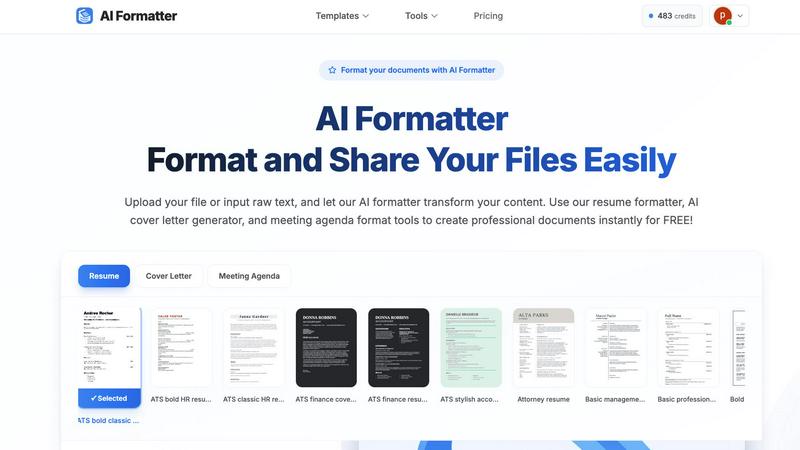
AI Formatter offers a library of over 162 professional templates, including ATS-optimized resumes, cover letters, and meeting agendas, designed to impress recruiters and pass automated screening systems.
Real-Time Online Editor
The platform includes a user-friendly, real-time online editor that allows users to fully customize their documents. Adjust fonts, colors, and layouts to ensure that each document reflects personal style and meets specific requirements.
Multi-Format Support
AI Formatter supports a wide range of file formats, including PDF, DOC, DOCX, and TXT, making it easy for users to upload existing documents or input raw text directly into the system for instant formatting.
Efficient Document Processing
With AI Formatter, users can expect rapid document processing. The AI-driven system efficiently formats content, maintaining the integrity of the original information while applying professional standards, saving valuable time for users.
CleanPaste.org
Instant Processing
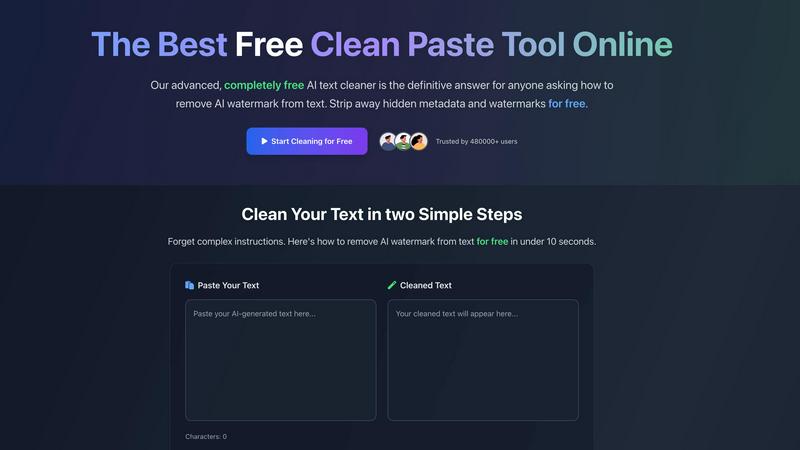
CleanPaste.org offers instant processing, allowing users to clean their text in mere seconds. By simply pasting their content and clicking clean, users can efficiently remove invisible characters and hidden formatting, ensuring their text is polished and ready for submission.
Watermark Removal Mode
The watermark removal mode is designed to effectively strip AI watermarks from text while preserving the original content's integrity. This feature ensures that users can present their work without the risk of detection, maintaining a natural and human-like quality.
Comprehensive Character Stripping
CleanPaste.org employs advanced algorithms to deep-scan text for invisible characters, including zero-width spaces and hidden metadata. This feature guarantees that all forms of unwanted elements are eliminated, providing users with a clean and professional output.
User-Friendly Interface
The platform boasts a user-friendly interface that simplifies the cleaning process. With intuitive navigation and clear instructions, users can effortlessly clean their drafts without any technical knowledge, making it accessible for everyone.
Use Cases
AI Formatter
Job Seeker Applications
Job seekers can utilize AI Formatter to create polished resumes and cover letters that meet ATS criteria, ensuring their applications stand out to potential employers in a competitive job market.
Academic Projects
Students and academics can streamline their report and thesis formatting by using AI Formatter to quickly apply professional layouts and styles, allowing them to focus on content rather than formatting.
Business Communication
Businesses can enhance their internal and external communication by using AI Formatter to produce professional meeting agendas, reports, and presentations, ensuring clear and effective messaging.
Invoice and Receipt Generation
Small business owners and freelancers can take advantage of AI Formatter’s invoice and receipt generation features to create professional billing documents, improving their financial operations and client relations.
CleanPaste.org
For Students: Clean Your Essays
Students can utilize CleanPaste.org to remove hidden characters and ensure their essays are free from AI traces. This tool provides the confidence needed to submit work that adheres to academic integrity standards, all at no cost.
For Content Creators: Maintain Authenticity
Content creators and bloggers can benefit from CleanPaste.org by using it to remove invisible characters and AI watermarks from their drafts. This ensures that their content resonates with their audience and maintains an authentic voice, enhancing their brand's credibility.
For Professionals: Clean Business Communications
Professionals can leverage CleanPaste.org to refine emails and reports generated with AI assistance. By cleaning their text, they can ensure that their communications appear polished and authentic, fostering trust with colleagues and clients.
For Freelancers: Enhance Portfolio Pieces
Freelancers can use CleanPaste.org to prepare their writing samples by stripping away any AI-related elements. This allows them to showcase their work in the best light, making a strong impression on potential clients and employers.
Overview
About AI Formatter
AI Formatter, developed by Sun Sky LLC, is a state-of-the-art, AI-powered document formatting platform that streamlines the document preparation process for a diverse range of users. This cloud-based Software as a Service (SaaS) tool allows individuals and businesses to convert unformatted text or uploaded files—including Word, PDF, and TXT formats—into impeccably formatted documents in just seconds. With an impressive ATS (Applicant Tracking System) pass rate exceeding 95%, AI Formatter is particularly beneficial for job seekers who want to elevate their resumes and cover letters. This tool not only saves users over two hours per document but also frees them to focus on more critical tasks. Whether you are a professional, entrepreneur, or academic, AI Formatter provides access to over 100 professional templates tailored to various industries. The platform features a real-time online editor that allows complete customization of fonts, colors, and layouts, ensuring that every document aligns with individual preferences. In addition, AI Formatter boasts capabilities like multi-format exports and secure sharing options, significantly enhancing usability and collaboration. This makes it an all-encompassing solution for efficient document creation.
About CleanPaste.org
CleanPaste.org is an innovative online tool tailored for individuals who seek to refine their text by removing AI watermarks, hidden metadata, and invisible characters. This user-friendly platform caters to a wide array of users, including students, content creators, and professionals, ensuring that their writing is presented as completely human-generated and devoid of detectable AI traces. The primary value proposition of CleanPaste.org lies in its commitment to providing a fast, efficient, and entirely free solution for text cleaning. With no sign-up requirements or usage limits, the platform is accessible to everyone. CleanPaste.org employs advanced algorithms to process text in real-time, allowing users to confidently submit their work or publish content. By eliminating unwanted elements, it enhances the originality and integrity of writing, making it a trusted choice for over 480,000 satisfied users who have benefitted from its capabilities.
Frequently Asked Questions
AI Formatter FAQ
How does AI Formatter ensure ATS compatibility?
AI Formatter's templates are designed with ATS systems in mind, utilizing industry-standard formatting practices that enhance the likelihood of passing automated screenings, thus increasing job seekers' chances of being noticed.
What file formats can I upload to AI Formatter?
AI Formatter supports several file formats, including PDF, DOC, DOCX, and TXT. Users can upload these formats or input raw text directly for instant transformation into professionally formatted documents.
Can I customize the templates provided by AI Formatter?
Yes, AI Formatter offers a real-time online editor that allows users to customize templates extensively. You can adjust fonts, colors, and layouts to suit your preferences and needs.
Is AI Formatter suitable for team collaboration?
Absolutely! AI Formatter’s secure sharing options facilitate easy collaboration among team members, making it an excellent tool for businesses and groups that need to work together on document creation and formatting.
CleanPaste.org FAQ
How does CleanPaste.org remove invisible characters?
CleanPaste.org utilizes advanced algorithms to detect and eliminate invisible characters, zero-width spaces, hidden metadata, and AI watermarks. Users only need to paste their content and click clean for instant results.
Is CleanPaste.org truly free? What's the catch?
Yes, CleanPaste.org is completely free with no hidden fees or sign-up requirements. The platform operates without usage limits, making it accessible to everyone who needs to clean their text.
What types of hidden characters does CleanPaste.org remove?
CleanPaste.org effectively removes various invisible characters, including zero-width spaces and hidden metadata, as well as AI watermarks. All features are available to users at no cost.
How can I ensure my text is genuinely cleaned?
To verify the cleanliness of your text, simply paste it into CleanPaste.org and activate the cleaning process. The tool will remove unwanted elements, allowing you to confidently present your content as human-generated.
Alternatives
AI Formatter Alternatives
AI Formatter is a cloud-based, AI-driven document formatting platform developed by Sun Sky LLC, designed to streamline the document preparation process for various users, including professionals, business owners, and academics. Its primary function is to transform raw text or uploaded files into polished documents using over 100 professional templates. Users often seek alternatives to AI Formatter due to factors such as pricing, specific feature requirements, or compatibility with their preferred platforms. When exploring alternatives, it's essential to consider the range of features offered, ease of use, customization options, and overall value for money. Additionally, assess whether the platform supports the document formats you typically work with and how well it integrates with your existing tools to ensure a seamless workflow.
CleanPaste.org Alternatives
CleanPaste.org is a free online tool designed to remove invisible characters, metadata, and AI watermarks from text, making it a vital resource for students, content creators, and professionals alike. Users commonly seek alternatives for various reasons, including pricing, specific features, or compatibility with different platforms. When choosing an alternative, it's essential to consider factors such as ease of use, the effectiveness of cleaning capabilities, and whether the tool meets individual needs without compromising on quality. --- [{"question": "What is CleanPaste.org?", "answer": "CleanPaste.org is a free online tool that instantly removes invisible characters, metadata, and AI watermarks from your text."},{"question": "Who is CleanPaste.org for?", "answer": "CleanPaste.org is designed for students, content creators, and professionals who want to ensure their writing is free from detectable AI traces."},{"question": "Is CleanPaste.org free?", "answer": "Yes, CleanPaste.org is entirely free to use, with no sign-up requirements or usage limits."},{"question": "What are the main features of CleanPaste.org?", "answer": "The main features of CleanPaste.org include instant watermark removal, hidden metadata stripping, a user-friendly interface, and integration with plagiarism checks."}]