Blueberry vs Lovalingo
Side-by-side comparison to help you choose the right product.

Blueberry
Blueberry is an all-in-one Mac app that integrates your editor, terminal, and browser for seamless web app development.
Last updated: February 28, 2026

Lovalingo
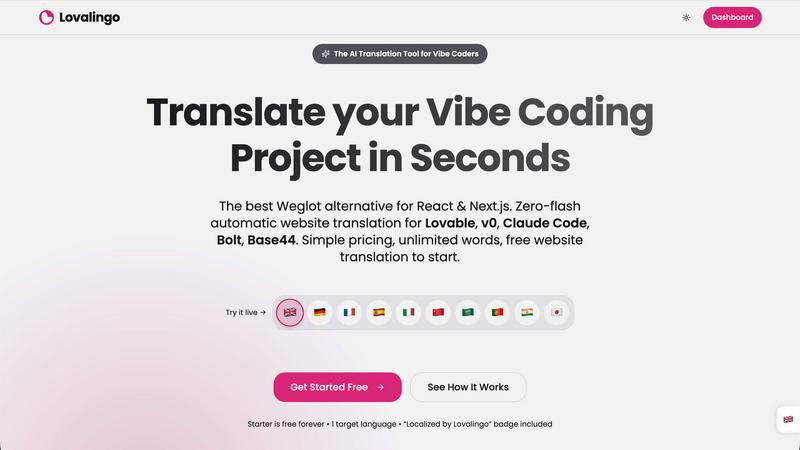
Lovalingo instantly translates and indexes your React app with your team, enabling seamless global collaboration.
Last updated: February 28, 2026
Visual Comparison
Blueberry

Lovalingo
Feature Comparison
Blueberry
Integrated Workspace
Blueberry combines a terminal, code editor, and browser into one cohesive environment. This integration allows developers to code, test, and preview their applications without the need to switch between different tools, fostering a more efficient workflow.
AI Contextual Awareness
With Blueberry's MCP, AI models like Claude and Codex gain full access to your workspace. This means they can understand and interact with your code and project in real-time, providing intelligent suggestions and insights tailored to your specific context.
Built-in Preview Options
Developers can preview their applications on various devices directly within Blueberry. This feature allows them to see how their work will appear on desktops, tablets, and mobiles, ensuring a responsive design without leaving the workspace.
Pinned Apps Functionality
Blueberry allows users to pin essential apps like GitHub, Linear, Figma, and PostHog within the workspace. This functionality keeps crucial tools within reach, enhancing collaboration and ensuring that your AI has all the necessary context for informed decision-making.
Lovalingo
Render-Native, Zero-Flash Translation
Unlike script-based solutions that manipulate the DOM after the page loads, Lovalingo integrates directly into your React application's render flow. This means translations are applied before the page paints, completely eliminating visual flicker, content flashes, and disruptive layout shifts. This native integration ensures a perfectly stable user experience and preserves your application's performance, providing a seamless foundation for your team's frontend work.
Automatic Translation & Zero Maintenance
Lovalingo removes the need for manual translation file management. It automatically detects text content within your application and handles translations in real-time. As your team builds new features, the content is auto-translated, so you never have to manually create or update thousands of string entries across multiple JSON files. This automation fosters team efficiency, allowing continuous deployment without i18n becoming a development bottleneck.
Built for AI-Powered Development (Vibe-Coding)
Lovalingo is designed from the ground up for synergy with AI coding assistants. Setup is achieved through a single, copy-paste prompt that your AI tool can execute instantly. This deep compatibility means your team can leverage the speed of tools like Lovable and v0 while effortlessly adding multilingual support in seconds, keeping the collaborative, rapid-development "vibe" intact without configuration headaches.
Native Multilingual SEO Tools
To support your team's global growth goals, Lovalingo automatically handles critical SEO infrastructure. It generates multilingual sitemaps, correctly implements hreflang tags, and manages meta descriptions for each language. This ensures search engines can properly index all language versions of your site from day one, turning your international launch into a collaborative success with built-in visibility.
Use Cases
Blueberry
Streamlining Development
Developers can use Blueberry to streamline their entire development process. By having all essential tools in one place, they can focus on writing code and building applications without the distractions of switching between multiple applications.
Real-time Collaboration
Teams can benefit from Blueberry’s collaborative features by working together in the same workspace. With AI providing contextual insights, team members can easily share ideas and improve code quality in real-time.
Rapid Prototyping
Designers and developers can quickly prototype web applications using Blueberry’s built-in features. The ability to preview changes instantly allows for rapid iterations and adjustments based on immediate feedback.
Enhanced Learning and Support
New developers can leverage Blueberry’s AI capabilities to learn coding concepts and receive instant support. The contextual understanding provided by the AI can help them grasp complex ideas more easily and improve their coding skills.
Lovalingo
SaaS Teams Scaling to New Markets
For SaaS founders and product teams looking to expand internationally, Lovalingo provides a frictionless path to localization. It allows the entire team to focus on core product development and market fit, while the translation and SEO heavy lifting is handled automatically, enabling a coordinated and efficient global rollout without stalling development velocity.
Agencies Building Client Projects on AI Platforms
Development agencies using Lovable, v0, or similar platforms can standardize on Lovalingo to deliver multilingual websites and applications faster for their clients. It simplifies project scope, reduces delivery time, and ensures a high-quality, stable localized experience, improving team throughput and client satisfaction on every collaborative project.
Development Teams Eliminating Manual i18n Overhead
For developer teams that dread the tedious maintenance of JSON translation files, Lovalingo automates the entire i18n pipeline. This removes a significant source of toil, reduces errors, and improves team morale by allowing engineers to concentrate on feature development instead of string management, fostering a more productive and collaborative environment.
Rapid Prototyping and MVP Launches
When teams are building and iterating on minimum viable products or prototypes at speed with AI tools, adding multiple languages is often a post-launch concern. Lovalingo allows teams to build with global readiness from the start, enabling instant translation that scales with the prototype, making user testing in different regions a seamless part of the collaborative development cycle.
Overview
About Blueberry
Blueberry is an innovative macOS application designed specifically for modern product builders seeking to streamline their workflow. By integrating a code editor, terminal, and web browser into a single focused workspace, Blueberry eliminates the frustration of juggling multiple windows and applications. It serves as a comprehensive platform where developers can efficiently build and ship web applications that impress users. With its AI-native capabilities, Blueberry connects seamlessly with powerful models like Claude, Gemini, and Codex through its built-in Multi-Context Protocol (MCP). This allows the AI to access real-time information about files, terminal outputs, and live previews, providing developers with constant context. The platform is currently available for free during its beta phase, making it an accessible tool for anyone looking to enhance their development process and create delightful web experiences.
About Lovalingo
Lovalingo is the collaborative translation engine built for the modern, AI-driven development workflow. It eliminates the traditional friction of internationalization (i18n) by automating the entire process, allowing development teams to scale their applications globally without the manual overhead. Designed specifically for "vibe coders" using AI-assisted tools like Lovable, v0, Claude Code, Bolt, and Base44, Lovalingo integrates natively into React and Next.js projects. Its core value proposition is synergy: it works seamlessly with your existing tools and team processes to deliver a zero-flash, automatically translated UI directly during the React render cycle. This means no more managing JSON files, no post-load DOM hacking that causes layout shifts, and no SEO headaches. For SaaS founders, agencies, and developers focused on rapid iteration and global growth, Lovalingo is the partner that handles translation complexity, so the team can focus on building and shipping features together.
Frequently Asked Questions
Blueberry FAQ
How does Blueberry improve my development workflow?
Blueberry enhances your workflow by integrating essential tools into one workspace, allowing for seamless transitions between coding, testing, and previewing applications without the hassle of switching apps.
Is Blueberry suitable for solo developers as well as teams?
Yes, Blueberry is designed to cater to both individual developers and teams. Its collaborative features and AI support make it an excellent choice for anyone looking to improve their development process.
What kind of AI models can I connect with Blueberry?
Blueberry supports a variety of AI models, including Claude, Gemini, and Codex. This flexibility allows developers to choose the model that best fits their needs and work style.
Is there a cost associated with using Blueberry during the beta phase?
Currently, Blueberry is 100% free during its beta phase, enabling users to take advantage of its features without any financial commitment.
Lovalingo FAQ
How does Lovalingo compare to traditional i18n libraries?
Traditional i18n libraries like i18next require developers to manually extract strings into JSON files and manage thousands of entries across languages. Lovalingo automates this entire process. There are no manual files to manage; it detects and translates content automatically in real-time, saving your team countless hours of maintenance and coordination.
Is Lovalingo better than Weglot for React apps?
Yes, for React and Next.js applications, Lovalingo offers a superior, team-friendly integration. Unlike Weglot, which uses an external script to swap text after page load (causing flicker), Lovalingo is a native React library that translates during the render. This guarantees stability, performance, and a better developer experience that aligns with modern React team workflows.
How does the "one prompt" setup work with AI tools?
Lovalingo provides a ready-to-use code prompt that includes the installation command and necessary provider wrapper code. Your team simply copies this prompt and pastes it into an AI coding assistant like Claude Code or the Lovable chat. The AI will execute the commands, installing the package and integrating the provider, enabling multilingual support in under 60 seconds through a collaborative effort with your AI tools.
Does Lovalingo work with static site generation (SSG) in Next.js?
Absolutely. Lovalingo is built for modern React frameworks and fully supports Next.js features including Static Site Generation (SSG) and Server-Side Rendering (SSR). The translations are processed appropriately for each rendering method, ensuring your team can build fast, SEO-friendly static sites with stable, pre-rendered multilingual content.
Alternatives
Blueberry Alternatives
Blueberry is a versatile Mac application designed for developers, merging an editor, terminal, and browser into a single, streamlined workspace. This integration allows users to enhance their productivity by eliminating the hassle of switching between multiple windows. As users explore the capabilities offered by Blueberry, they may seek alternatives for various reasons, such as pricing considerations, specific feature requirements, or compatibility with different platforms. When evaluating alternatives, it's essential to focus on the core functionalities that enhance workflow, such as real-time collaboration, seamless integration with various models, and user-friendly interfaces. Users should also consider the support for various programming languages and development tools, as well as the overall user experience and community support. Finding an option that aligns with personal or team needs can significantly boost efficiency and foster collaboration.
Lovalingo Alternatives
Lovalingo is a modern solution for translating and indexing React applications, operating within the SEO and internationalization (i18n) space. It streamlines the process by automating translation and SEO tasks directly within the React render cycle, eliminating the need for manual JSON file management. Teams often explore different tools to find the perfect fit for their specific workflow and budget. Common considerations include the total cost of ownership, the depth of SEO automation, compatibility with their chosen development platform, and the overall developer experience. It's a collaborative process to align a tool's capabilities with the team's technical stack and growth objectives. When evaluating options, focus on how a solution integrates with your team's workflow. Key aspects to consider are native framework compatibility to avoid performance issues, automated SEO handling for global reach, and a maintenance model that doesn't create ongoing overhead for your developers. The goal is to find a partner that enhances your team's synergy, allowing you to scale effortlessly.