Beesift vs Tickari
Side-by-side comparison to help you choose the right product.

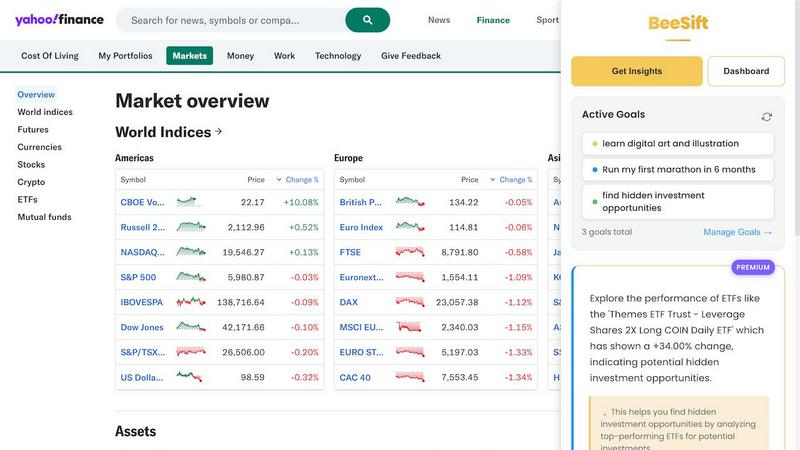
Beesift transforms webpages into actionable insights aligned with your goals, saving you time and reducing information.
Last updated: March 1, 2026

The no-nonsense task manager that actually helps you get things done. No clutter. No complexity. Just you and your tasks.
Visual Comparison
Beesift
Tickari

Overview
About Beesift
BeeSift is an innovative Chrome extension that revolutionizes the way users engage with online content, specifically designed to tackle the pervasive issue of information overload. It empowers individuals—students, professionals, entrepreneurs, and lifelong learners alike—by streamlining the process of extracting relevant insights from any webpage. BeeSift allows users to efficiently identify and summarize key information that aligns with their personal and professional goals, bypassing unnecessary fluff and distractions. By utilizing advanced AI technology, this tool highlights actionable insights tailored to individual objectives, making it an essential asset for anyone looking to enhance productivity and streamline their research efforts. Additionally, BeeSift prioritizes user privacy, ensuring that your browsing history remains confidential while you navigate the vast sea of online information. With its commitment to relevance and efficiency, BeeSift is designed to save valuable time and elevate the learning experience.
About Tickari
Tickari is a deliberately minimal, no-nonsense task manager designed for people who are tired of overcomplicated productivity tools and just want to get things done. Instead of overwhelming you with features like complex boards, AI-generated suggestions, or endless customization, Tickari focuses on a simple, frictionless workflow: write a task, tick it off, and move on.
The product embraces a “less but better” philosophy—eliminating clutter, reducing cognitive overhead, and removing the need for onboarding tutorials or setup processes. There are no distractions, no unnecessary decisions, and no feature bloat—just a clean interface that works instantly the moment you open it. This makes it particularly effective for users who feel stuck organizing tasks instead of actually completing them.