Anyone.com vs Tickari
Side-by-side comparison to help you choose the right product.

Anyone.com
Anyone.com is your collaborative platform to manage all real estate leads, clients, and deals together.
Last updated: February 28, 2026

The no-nonsense task manager that actually helps you get things done. No clutter. No complexity. Just you and your tasks.
Visual Comparison
Anyone.com
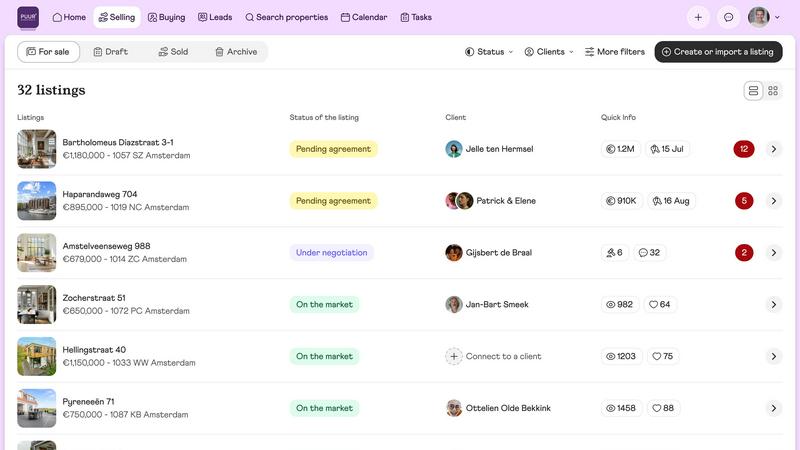
Tickari

Overview
About Anyone.com
Anyone.com is a collaborative, all-in-one real estate platform designed to foster synergy between agents, buyers, and sellers. It serves as a comprehensive digital workspace where real estate professionals can seamlessly manage every aspect of their business, from initial lead generation to final transaction closure. The platform empowers agents by providing them with a powerful, integrated toolkit to manage listings, clients, and communications, all while connecting them with highly motivated buyers and sellers through its intelligent matching engine. For consumers, Anyone.com offers a transparent, secure, and efficient journey to find trusted agents, schedule viewings, and navigate the entire buying or selling process. By eliminating traditional commissions in favor of a simple flat fee for agents and integrating vast property data with AI-driven tools, Anyone.com revolutionizes the market. It creates a unified ecosystem where all parties work together more effectively, ensuring a faster, fairer, and more connected real estate experience for everyone involved.
About Tickari
Tickari is a deliberately minimal, no-nonsense task manager designed for people who are tired of overcomplicated productivity tools and just want to get things done. Instead of overwhelming you with features like complex boards, AI-generated suggestions, or endless customization, Tickari focuses on a simple, frictionless workflow: write a task, tick it off, and move on.
The product embraces a “less but better” philosophy—eliminating clutter, reducing cognitive overhead, and removing the need for onboarding tutorials or setup processes. There are no distractions, no unnecessary decisions, and no feature bloat—just a clean interface that works instantly the moment you open it. This makes it particularly effective for users who feel stuck organizing tasks instead of actually completing them.